
Approximately 86% of SEO professionals use AI (artificial intelligence) such as ChatGPT as their marketing assistant. The days of spending hours worrying over a single email are already in the rear-view mirror!
Are you really using ChatGPT to its full potential? Your AI assistant can do much more than you may realise.
Keep reading to discover 44 of the best ChatGPT prompts for SEO — designed to turn hours of keyword research, page optimisation, schema generation and competitor analysis into a 15-minute process.
What is the secret to getting ChatGPT to produce top-quality content?
A killer prompt!
What is a ChatGPT prompt for SEO?
ChatGPT prompts are specific sets of instructions you give the ChatGPT bot, directing it to complete a search engine optimisation task in its response, such as writing a blog post or suggesting keywords.
It is like briefing an intern: you want to be as clear, concise and specific as possible.
The more precise the prompt, the more precise ChatGPT’s response will be.
Elements of a good ChatGPT prompt
Review all the tips below before submitting your prompt. The bigger the task, the longer the prompt usually needs to be. You have a 4,096-character limit. Use it effectively.
Here is your checklist for checking prompt quality before you press Enter:
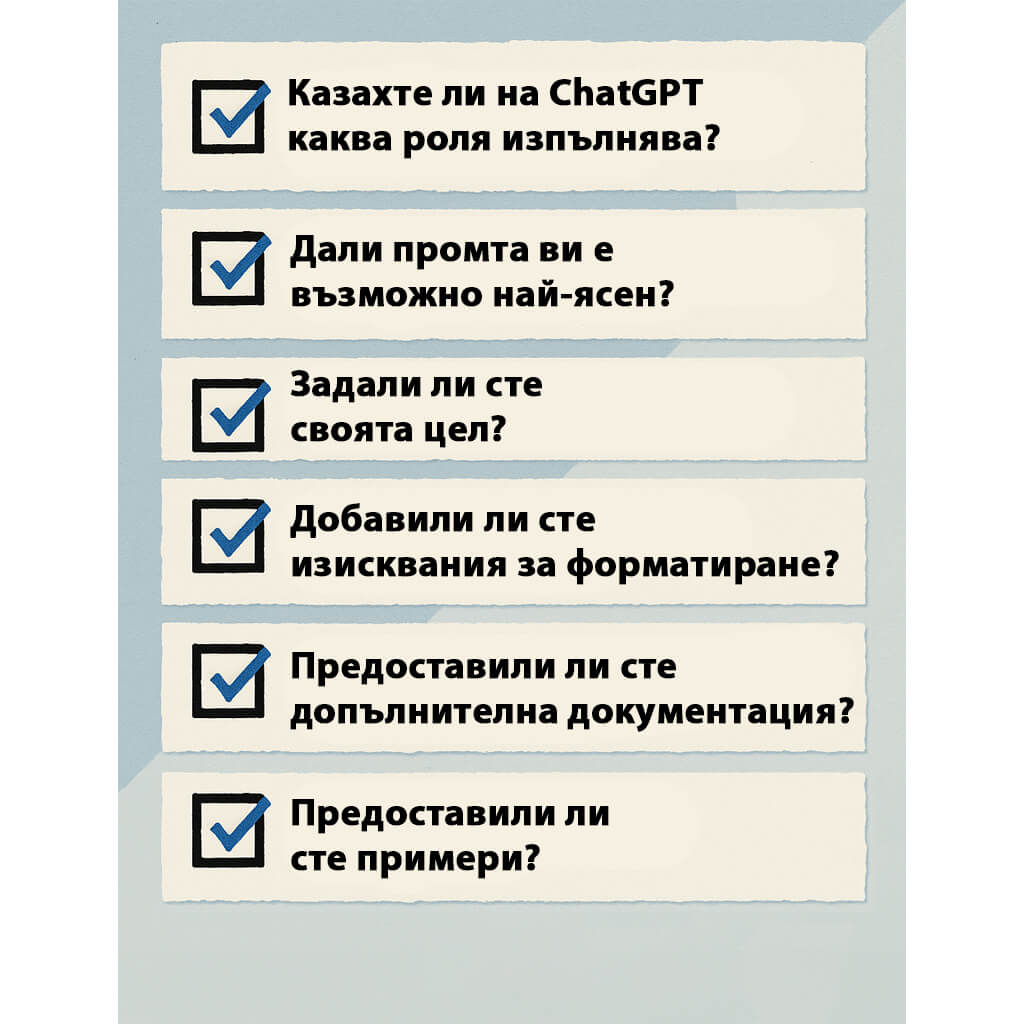
Did you tell ChatGPT what role it should play?
Give ChatGPT a persona or job title to work with. This helps it frame the answer with the right tone and level of complexity.
For example: “You are an experienced SEO strategist” or “You are a technical SEO expert who specialises in website migrations and speaks to a beginner audience.”
Is your prompt as clear as possible?
Yes, it sounds obvious, but it is not always easy. Clarify exactly what you need. Do you want a list? A paragraph? Bullet points? Idea generation?
For example: “List five blog ideas in bullet points targeting the key phrase ‘how to use ChatGPT for B2B SEO’. Choose ideas intended for a management-level audience.”
Have you defined your goal?
If ChatGPT knows why you are asking the question, it can tailor its response more effectively.
For example: “Write a meta description that increases CTR by highlighting how [client product] is better than [competitor product]. Base the reasoning on the cost-effectiveness of [client product].”
Have you added formatting requirements?
Include requirements for tone, length, formatting, keywords and audience.
For example: “Write a three-paragraph product description for a Shopify page using our company standards, targeting terms such as ‘cat jackets’ and using a bullet list for the product features.”
Have you provided additional documentation?
Give ChatGPT previous work, brand guidelines and competitor pages before prompting it. And remember to remind it what it knows — ChatGPT can have a poor memory too.
Have you provided examples?
ChatGPT still cannot read minds. If you have a specific idea of what you want, tell it.
For example: “Format this content as a three-column table using the headings ‘keyword’, ‘search volume’ and ‘keyword difficulty’.
Checking these elements when creating your prompt will produce a much better result, whether you want schema, new content or an entirely new blog post. The more specific you are, the higher the quality of content you can unlock from ChatGPT.
And the best part? You do not need to be afraid of being penalised for using generative AI.
“Our focus is on the quality of content, rather than how the content is produced.”
Yes, using automation — including AI — to generate content primarily to manipulate rankings is a bad practice. But what about proper use?
“Appropriate use of AI or automation is not against our guidelines. This means it is not used to generate content primarily to manipulate search rankings, which is against our spam policies.”
In other words: proper use is completely acceptable.
But what exactly does Google consider “proper use” of AI?
Google is deliberately not very specific. The key point is that you should still create high-quality content that helps users. As long as your ChatGPT-generated blog genuinely answers the user’s question, you are on the right track.
SEO content prompts (with copy-and-paste examples)
The first rule of SEO is that you need quality content to rank in Google. These prompts show you how to create copy optimised for both keywords and users, giving you a solid foundation for ranking.
Blog post outline from a keyword
ChatGPT is a great place to quickly generate content briefs and blog outlines.
Make sure you provide detailed information about:
- Target audience
- Keyword
- Search intent
- Competitors
- Content length
Prompt: You are a content strategist with expertise in writing SEO blog posts. Create a detailed outline for a blog post targeting the keyword [keyword].
Include related terms such as [keyword], [keyword] and [keyword].
Aim for [specify word count].
Your target audience is [specify your audience]. The goal of this content is to [educate, convert, etc.].
High-ranking competitors include [competitor]. Emulate and improve upon their content.
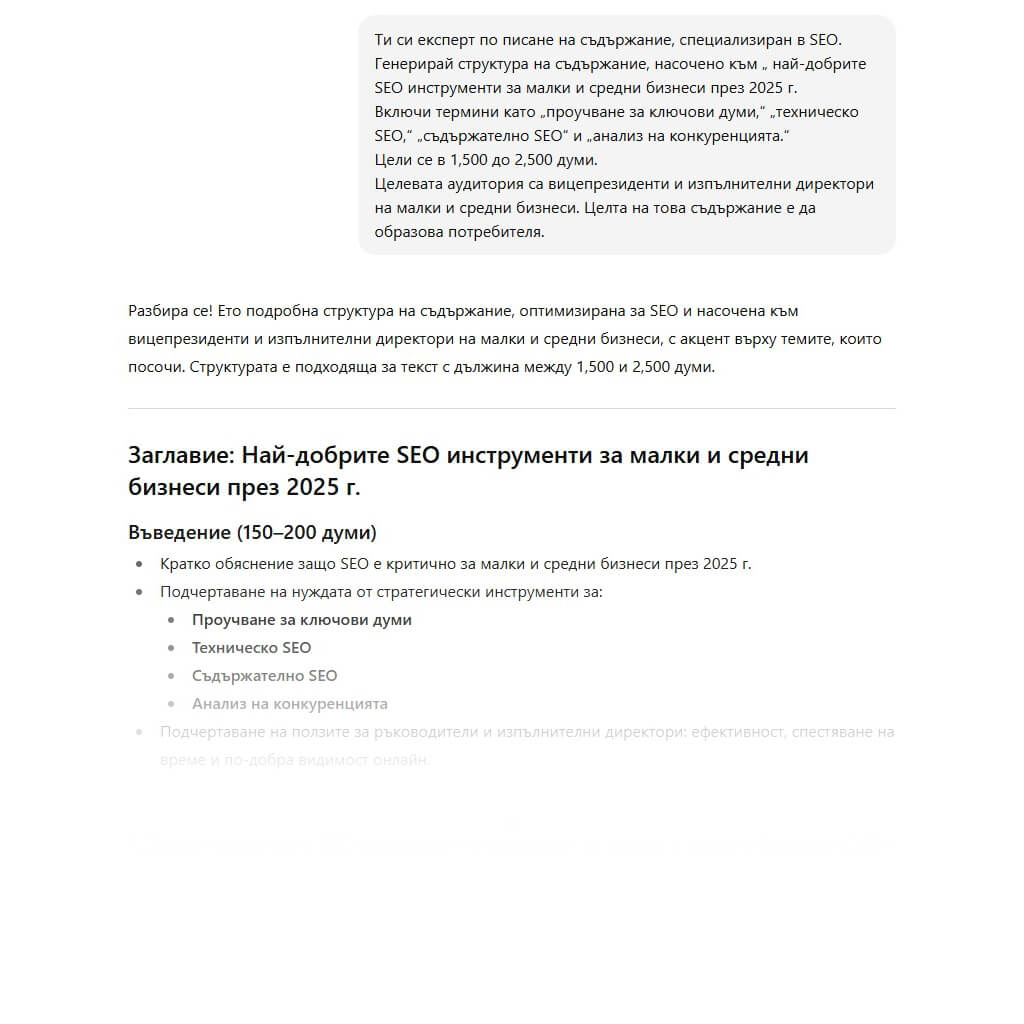
The screenshot below shows ChatGPT’s response when the following prompt was submitted:
“You are a content-writing expert specialising in SEO. Generate a content outline targeting ‘the best SEO tools for small and medium-sized businesses in 2025’.
Include terms such as ‘keyword research’, ‘technical SEO’, ‘content SEO’ and ‘competitor analysis’.
Aim for 1,500 to 2,500 words.
The target audience is vice presidents and CEOs of small and medium-sized businesses. The goal of this content is to educate the user.
Featured snippet optimisation
Use an SEO prompt in ChatGPT to rewrite your content so it is better optimised for featured snippets.
But what exactly is a featured snippet?
Featured snippets are specialised search results that appear at the top of Google’s search results pages, or below the AI Overview when one is present. They most often appear in response to long-tail, informational or question-based searches.
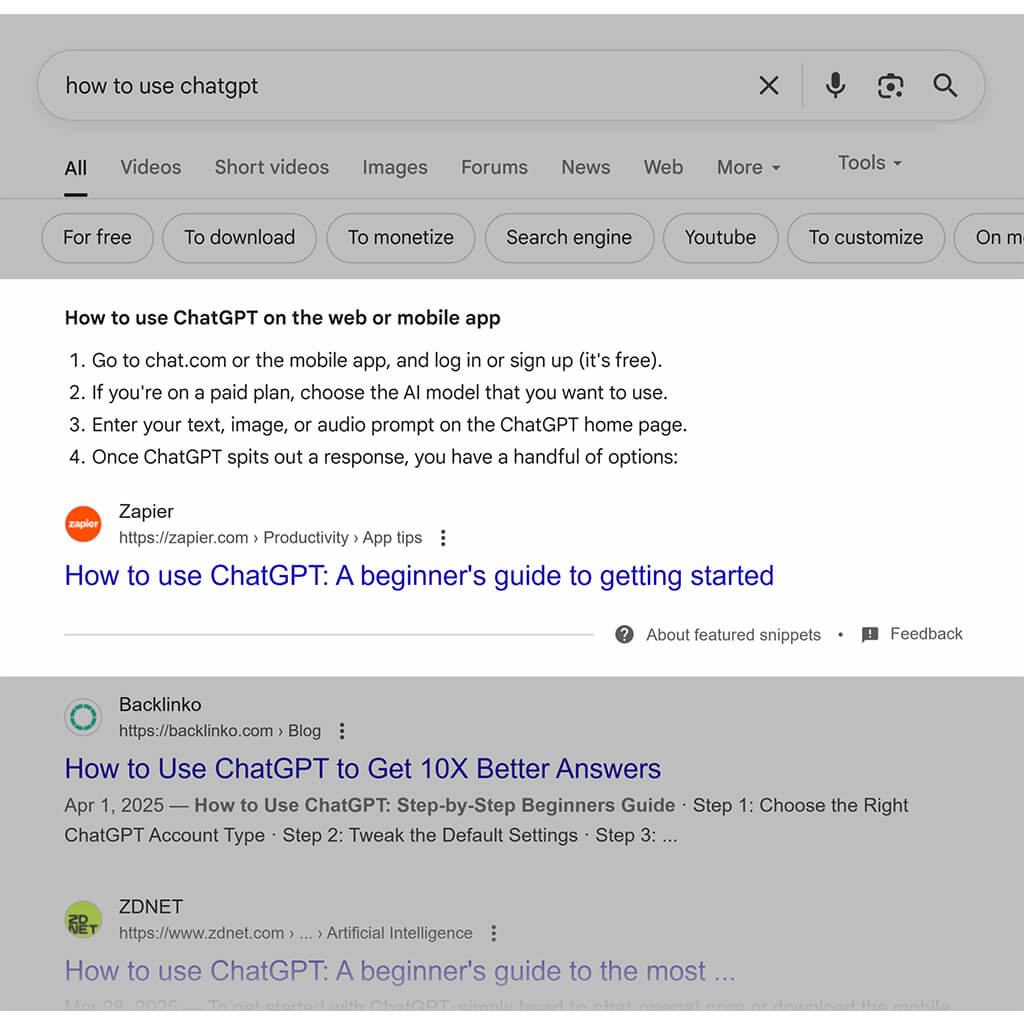
Ranking for featured snippets is a specialised skill that requires careful competitor analysis, keyword research and strong content-writing skills.
To use ChatGPT for featured snippet optimisation, you will need:
- Target keyword
- Competitors
- Content formatting
Here is what to use as your prompt:
Prompt:
You are an expert in SEO and content writing. You specialise in reworking content so it can rank for a featured snippet in Google. Review this text [insert current content]. I want it to rank for a featured snippet for [keyword].
At the moment, [competitor] ranks using [content format] with [copy and paste the current competitor content]. Please rewrite the content I provided so that it is better optimised to rank as a featured snippet.
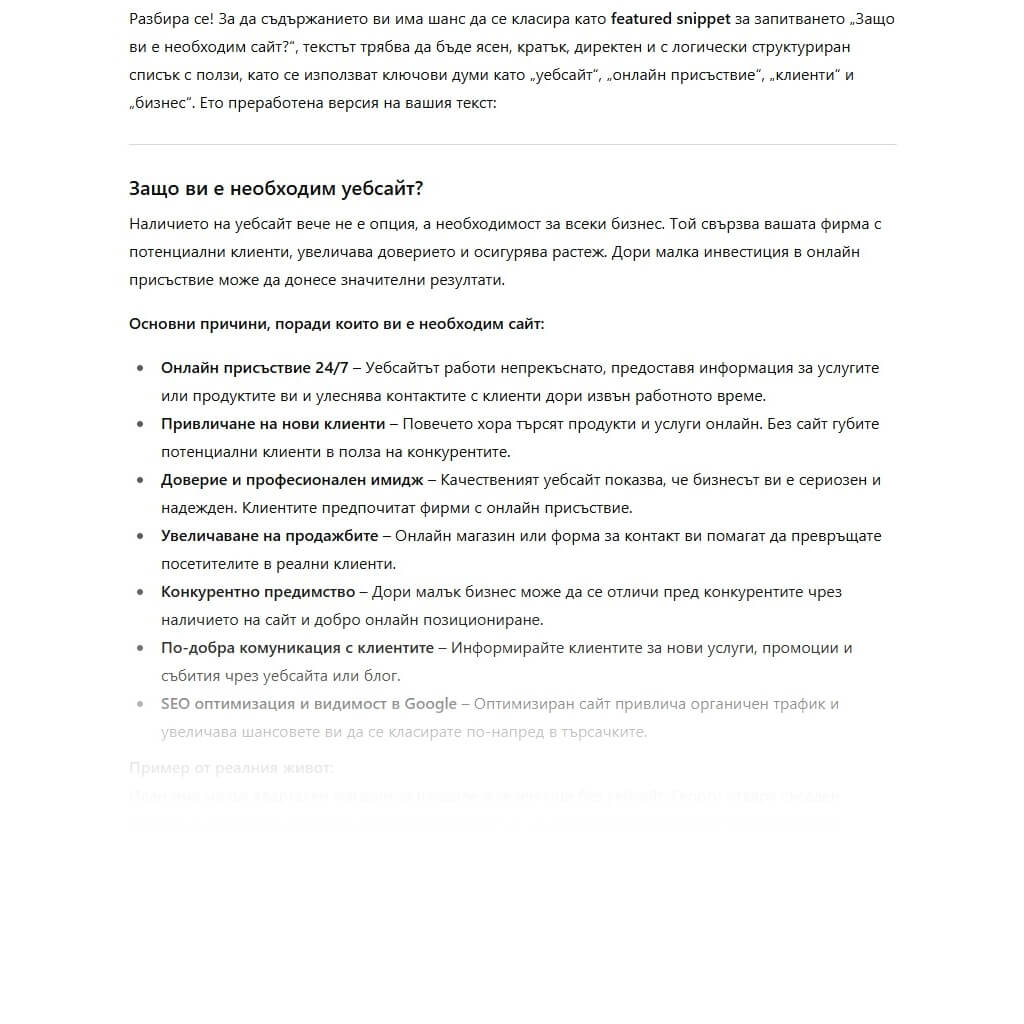
Protip: Featured snippets favour content formatted as bullet lists or short paragraphs. Google wants content that is easy to scan and quick to digest. Structure your content accordingly.
Generating title tags and meta descriptions
Use ChatGPT to generate metadata. Your title tag and meta description are key content elements when it comes to driving traffic to your site. Below is an example of how a title tag, highlighted in yellow, and a meta description, highlighted in green, appear in search results (SERPs).
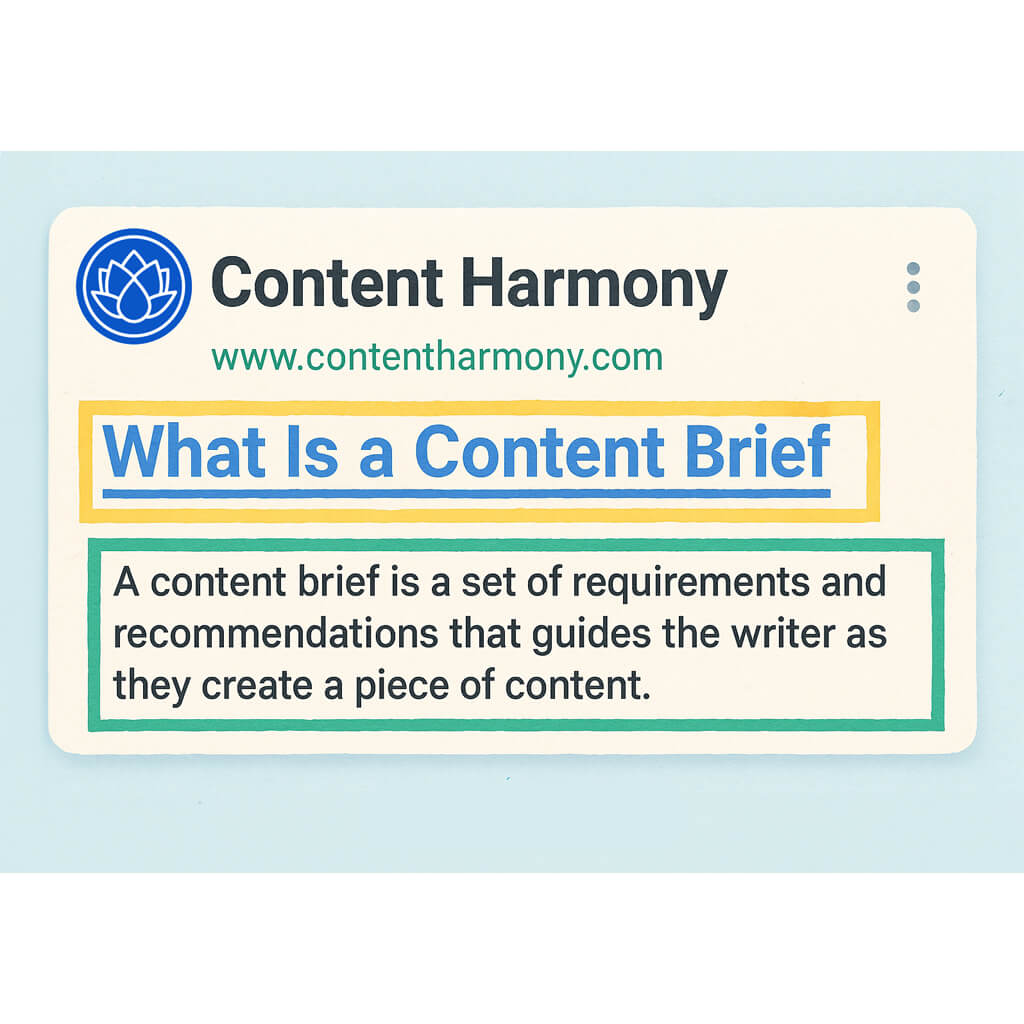
Your title tag is essentially the title of your page and is usually the same as your H1. Start with your primary keyword. Try to keep it between 60 and 70 characters. If it is too short, you are not making full use of the available space. If it is too long, Google will truncate it.
Your meta description is like the back cover of a book. It describes what the user can expect to read on your page. It does not directly affect rankings, but terms included in the search query may be bolded. A well-optimised meta description can therefore make your content’s relevance clearer and increase CTR. Aim to keep meta descriptions between 140 and 160 characters.
When using ChatGPT to generate metadata, you may need to guide it closely. ChatGPT is still not especially good at counting large numbers of characters, so even when you give it a limit, it often pushes that limit.
This means that if you want to generate metadata at scale, it is best to place the information in a table so you can easily check character counts in a spreadsheet.
Prompt:
You are an SEO expert. Create title tags (<70 characters) and meta descriptions (140–160 characters) for the following list of URLs: [paste list of URLs]. Base the target keywords on the terms included in each slug.
You can also use ChatGPT to generate several optimisation ideas for a single page:
Prompt:
You are an SEO expert who excels at writing on-brand, search-optimised metadata with a high CTR. Create five different title tags and meta descriptions for [URL]. The target keywords are [keywords]. The main CTAs to include are [CTA]. Focus on improving CTR while staying within the character limits.
Internal linking suggestions
Internal linking is important for both users and search engines because it makes your site easier to navigate.
To take your internal linking strategy to the next level, provide ChatGPT with:
- Your website sitemap or a list of relevant URLs
- The text of the page from which you want to link
Prompt:
You are an SEO expert helping me improve internal links on my website. Review the content below and suggest strong internal links based on this list of URLs [paste target URL list]. Format your response by listing the pages I should link to and the keyword-optimised anchor text I should use.
Your title tag is essentially the title of your page and is usually the same as your H1. Start with your primary keyword. Try to keep it between 60 and 70 characters. If it is too short, you are not making full use of the available space. If it is too long, Google will truncate it.
Your meta description is like the back cover of a book. It describes what the user can expect to read on your page. It does not directly affect rankings, but terms included in the search query may be bolded. A well-optimised meta description can therefore make your content’s relevance clearer and increase CTR. Aim to keep meta descriptions between 140 and 160 characters.
When using ChatGPT to generate metadata, you may need to guide it closely. ChatGPT is still not especially good at counting large numbers of characters, so even when you give it a limit, it often pushes that limit.
This means that if you want to generate metadata at scale, it is best to place the information in a table so you can easily check character counts in a spreadsheet.
Prompt:
You are an SEO expert. Create title tags (<70 characters) and meta descriptions (140–160 characters) for the following list of URLs: [paste list of URLs]. Base the target keywords on the terms included in each slug.
You can also use ChatGPT to generate several optimisation ideas for a single page:
Prompt:
You are an SEO expert who excels at writing on-brand, search-optimised metadata with a high CTR. Create five different title tags and meta descriptions for [URL]. The target keywords are [keywords]. The main CTAs to include are [CTA]. Focus on improving CTR while staying within the character limits.
Review for excessive keyword use (keyword stuffing)
ChatGPT may not be great at counting the exact number of characters in your title tag and keeping it under 65 characters, but do you know what it can count? How many times your target keyword appears in the page copy.
Checking keyword density — how often the target term appears in the text — can help you avoid keyword stuffing. Keyword stuffing is something Google may penalise, so use this prompt to avoid over-optimisation.
A useful rule of thumb is to include the target term only one to three times per 100 words. In other words, no more than 1–3% of your text should be mentions of the target keyword.
Prompt:
You are an SEO expert. Count how many times my target keywords [insert keywords] are used in this text [paste text]. Check whether I am overusing keywords or whether I have the right amount to clearly signal to users and search engines what the content is about.
Creating FAQ content for schema
Schema is a type of structured data — HTML code that you add to a page to help search engines better understand its content. It does not directly improve rankings and is not visible on the page, but it can help you occupy more space in search results (SERPs).
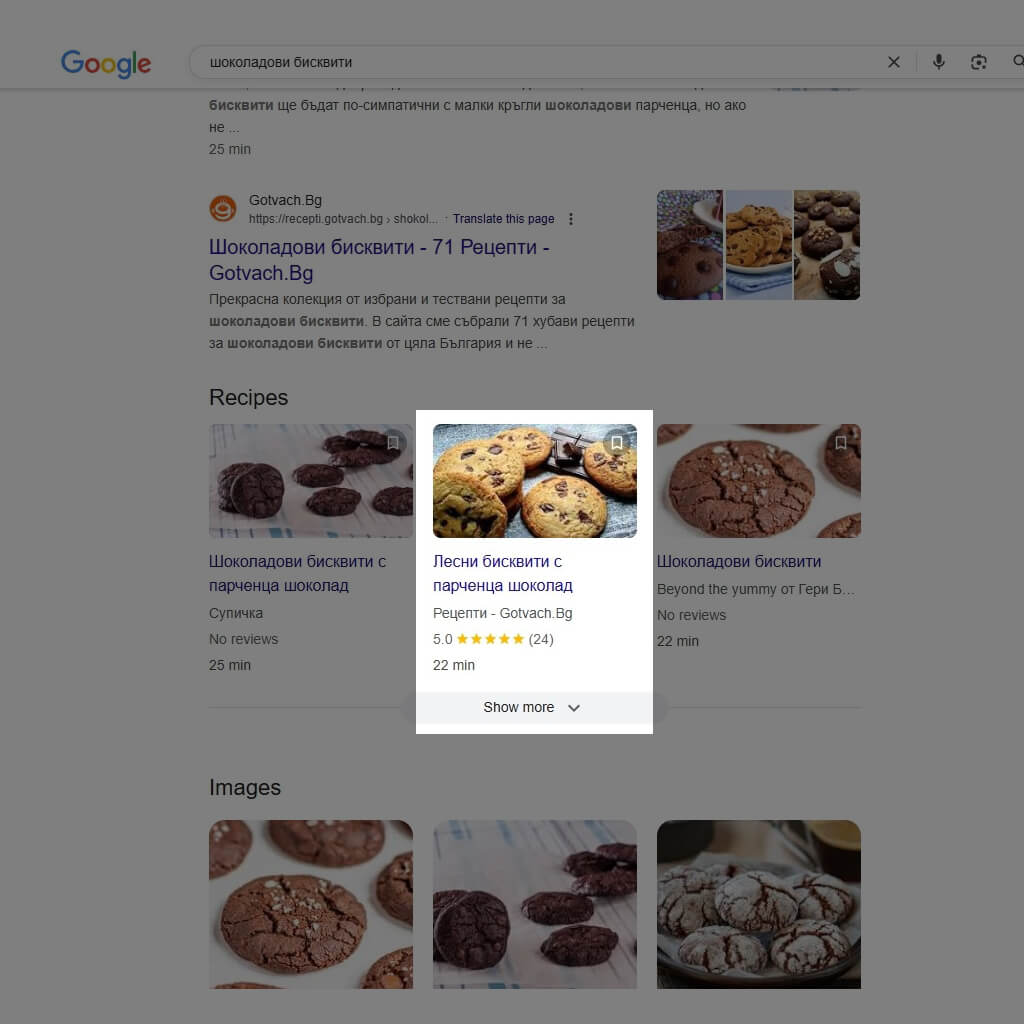
For example, if you were creating a page for your grandmother’s favourite chocolate-chip cookie recipe, you could add recipe schemaThis addition helps Google understand that the recipe takes 22 minutes, requires brown sugar and has a five-star rating from more than 24 reviews.
FAQ content should be written clearly and concisely in a Q&A format. Adding FAQPage schema to this content increases your chances of appearing in sections People Also Ask and featured snippets. See an example of a People Also Ask element in the search results below.
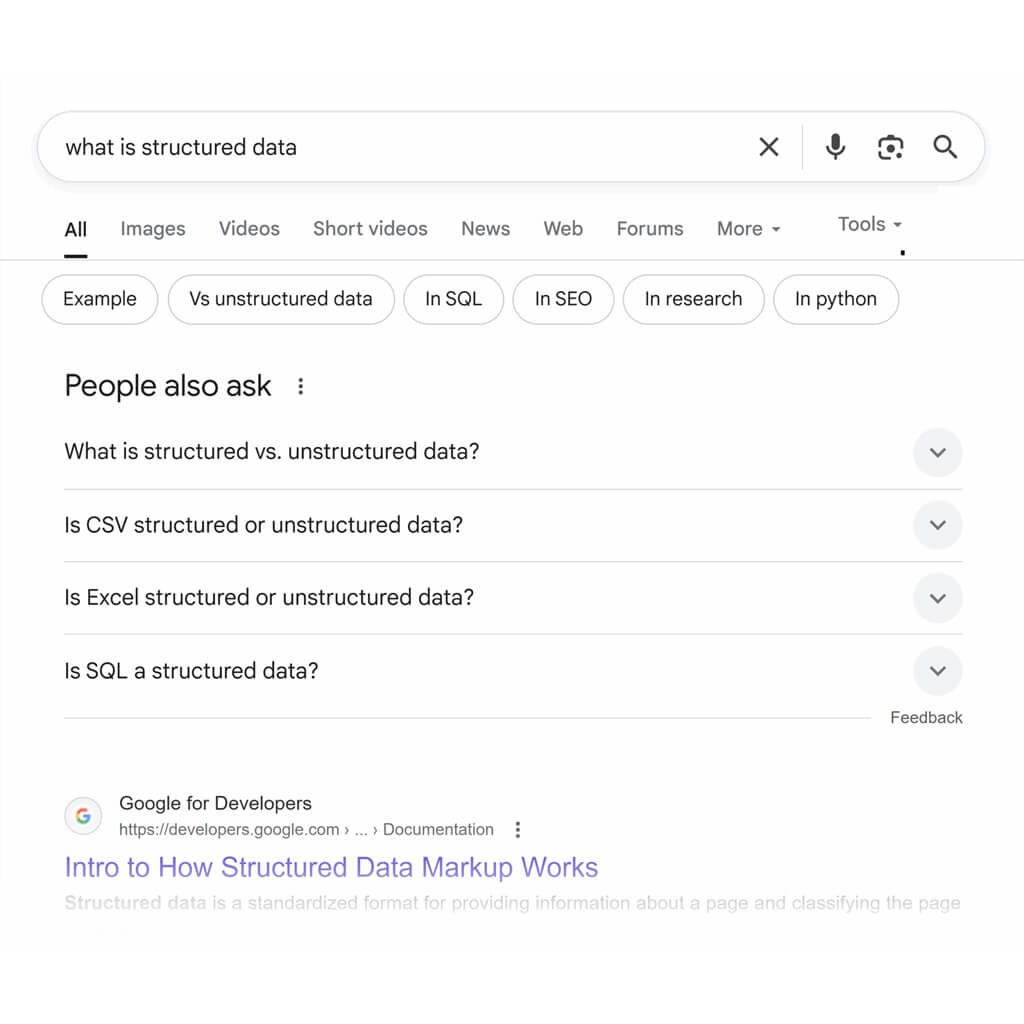
Your FAQ content should always be created with the audience in mind. You can get question ideas directly from search results by analysing the People Also Ask, or you can turn to ChatGPT.
Prompt:
Act as an SEO copywriter. I am creating an FAQ section for a [product page, category page, blog page, etc.]. I am targeting the keyword [keyword]. The audience is [describe target audience].
Please generate five to seven frequently asked questions and answers that:
- Answer common user questions related to this keyword
- Are written in a way that is suitable for FAQPage schema
- Use our brand tone (provide examples of the brand tone)
- Keep answers concise — no more than two or three sentences each
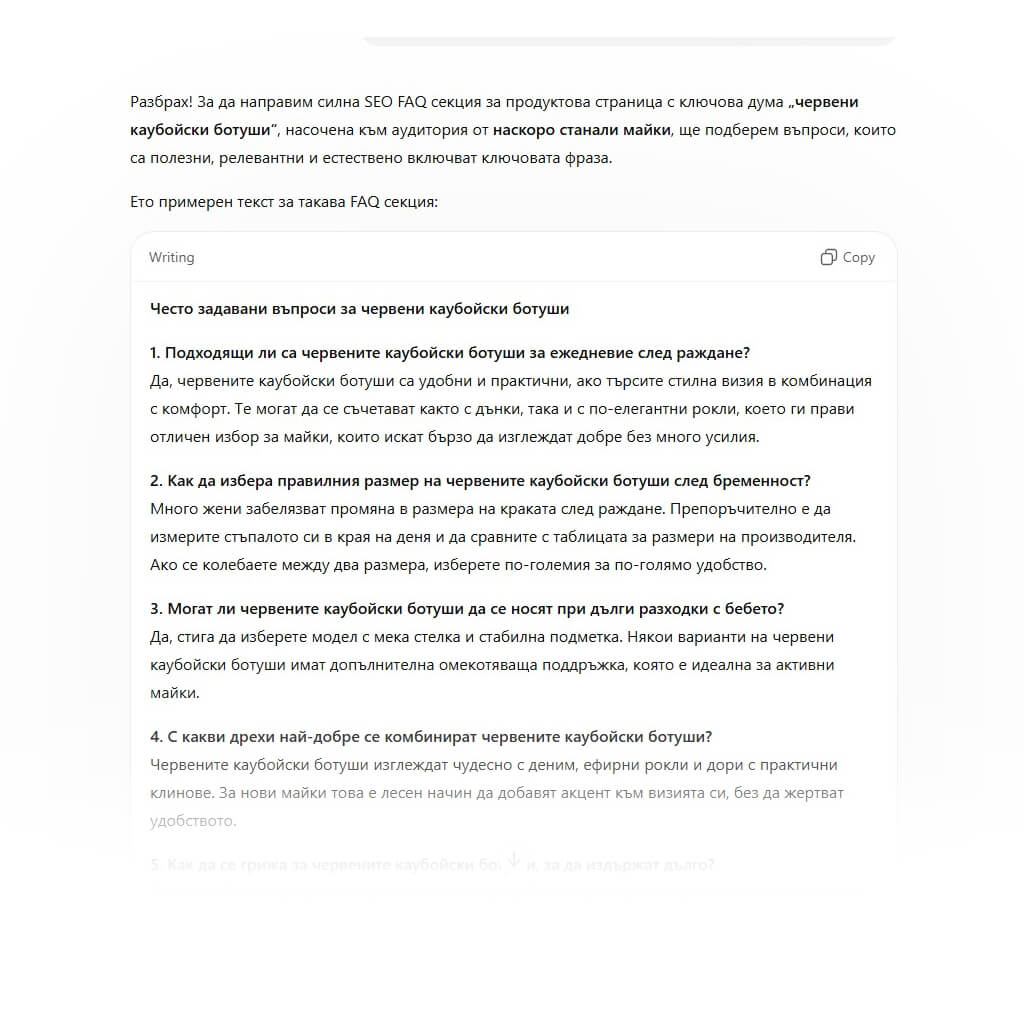
Let’s say you are generating FAQ schema for a new product page featuring a pair of red cowboy boots and targeting new mothers who want to refresh their wardrobe. Your ChatGPT-generated FAQ section might look like this:
Keyword research prompts
Keyword research is the process of identifying the words and phrases your target audience searches for in Google to find the products and services you offer.
When working with ChatGPT using these prompts, consider factors such as monthly search volume, keyword difficulty, search intent and the stage of the marketing funnel your keywords belong to.
- Monthly search volume is how often a term is searched for on average each month. A term with fewer than 50 searches per month is usually considered low-volume, while a term with more than 1,000 searches is popular.
- Keyword difficulty is how difficult it is to rank for a term. This number is measured on a scale from 0 to 100 and is based on the authority and number of pages already ranking. A term with difficulty below 30 should be significantly easier to rank for than a term with difficulty 60.
- Search intent is the user’s ultimate goal when performing a search.
There are four different types of search intent:
- Informational: Users looking for an answer to a question (“what is the best cat food”)
- Commercial: Users researching a product before making a purchase (“best cat foods”)
- Transactional: Users ready to make a purchase (“cat food for sale”)
- Navigational: Users looking for a specific website or page (“kotki.com”)
The marketing funnel represents the stages a customer goes through before making a final purchase or decision. It has three parts:
- Top of the funnel: Represents informational searches. These are users who are still looking for answers.
- Middle of the funnel: Users moving towards a purchase. These are usually commercial terms such as “brand vs brand” and navigational searches.
- Bottom of the funnel: Users ready to buy. They have already decided what they want to purchase and from whom.
Pro tip:tip: ChatGPT can only estimate figures such as monthly search volume and keyword difficulty, so use your traditional SEO tools when collecting these metrics.
Keyword research for a new page
ChatGPT can do much of the groundwork for the new blog post you are planning. Use this prompt to quickly identify all the short-tail and long-tail keywords you need for writing and optimisation.
- Short-tail keywords are terms that are searched frequently. They are usually one to three words long and harder to rank for because they are broad, but they can be useful for reaching a wider audience.
- Long-tail keywords are terms with three or more words. They usually have lower search volume but are easier to rank for because competition is weaker. Pay particular attention to these keywords for more specific pages.
Make sure you ask ChatGPT to show keywords with a specific search intent, because every organic page should be built to serve a particular user intent.
Combine this information into one prompt to get your keyword research:
Prompt:
You are my SEO assistant. You specialise in keyword research for [industry]. Provide a list of 100 search terms that will support a page based on [target keyword]. Include short-tail and long-tail keywords. Focus on [specify search intent] keywords. Present this information in four columns, separating short-tail, long-tail and search intent, with a final column for notes.
Here is what ChatGPT provided when I entered the following prompt:
You are my SEO assistant. You specialise in keyword research for the economics sector. Provide a list of 100 search terms that will support a page based on “microeconomics for beginners”. Include short-tail and long-tail keywords. Focus on informational keywords. Present this information in four columns, separating short-tail, long-tail and informational keywords, with a final column for notes.
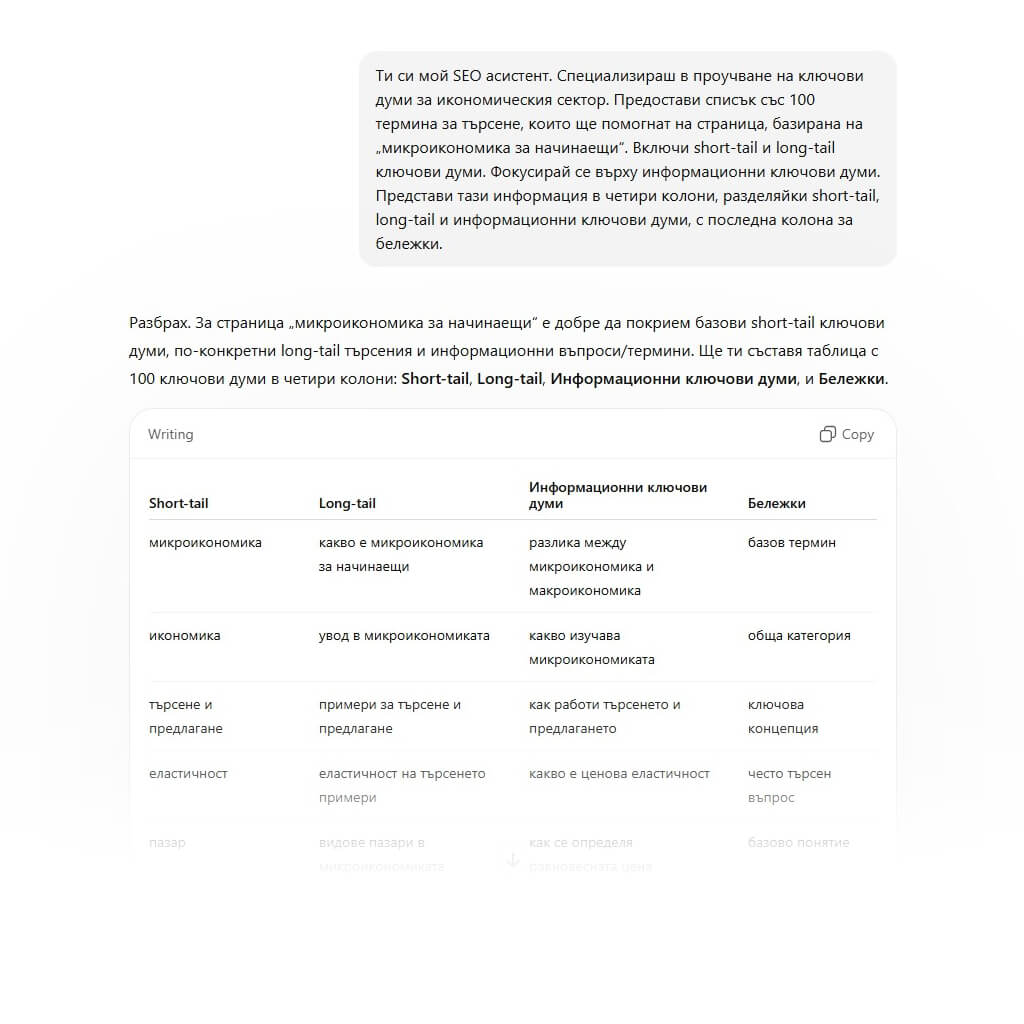
This prompt gives you an instant list of keyword ideas so you can start optimisation straight away. If the terms do not fit, you can always return to ChatGPT for more.
Creating question-based keywords from your target term
Yes, you still need to research competitors and search results pages for content such as FAQ and People Also Ask, but you can also automate this research.
What is the best way to get this type of content? Instead of telling ChatGPT it is a worker, tell it it is a customer. Get inside the mind of your target audience to better understand the questions people ask.
Here is how to ask ChatGPT to create an ultra-specific list of questions for building informational content:
Prompt:
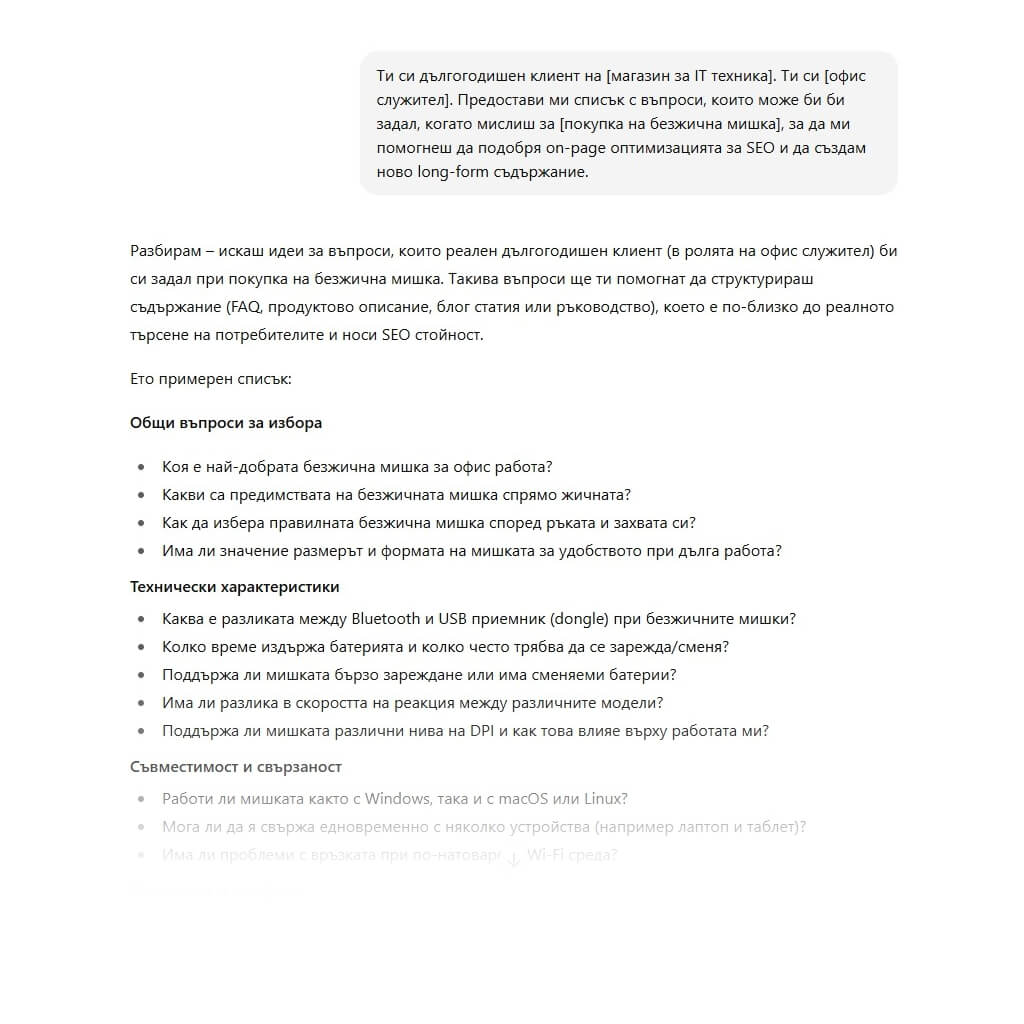
You are a long-time customer of [your company]. You are [describe this target persona: new mother, student, office worker, etc.]. Give me a list of questions you might ask when thinking about [common problem/pain point of the target persona] to help me improve on-page SEO optimisation and create new long-form content.
Here is what this prompt looks like in action:
Grouping keywords by search intent
When working on keyword research, try grouping keywords by search intent. This shows you what type of content you should build or optimise to rank better for each term.
In the old days, SEO specialists had to do this manually. Now all you need to do is ask ChatGPT:
Prompt:
You are an SEO expert who excels at keyword research. Here is a list of target terms [paste keyword list]. Please sort them by search intent (transactional, commercial, informational, navigational). Present the final result as a bullet list, with each intent type separating the sorted keywords.
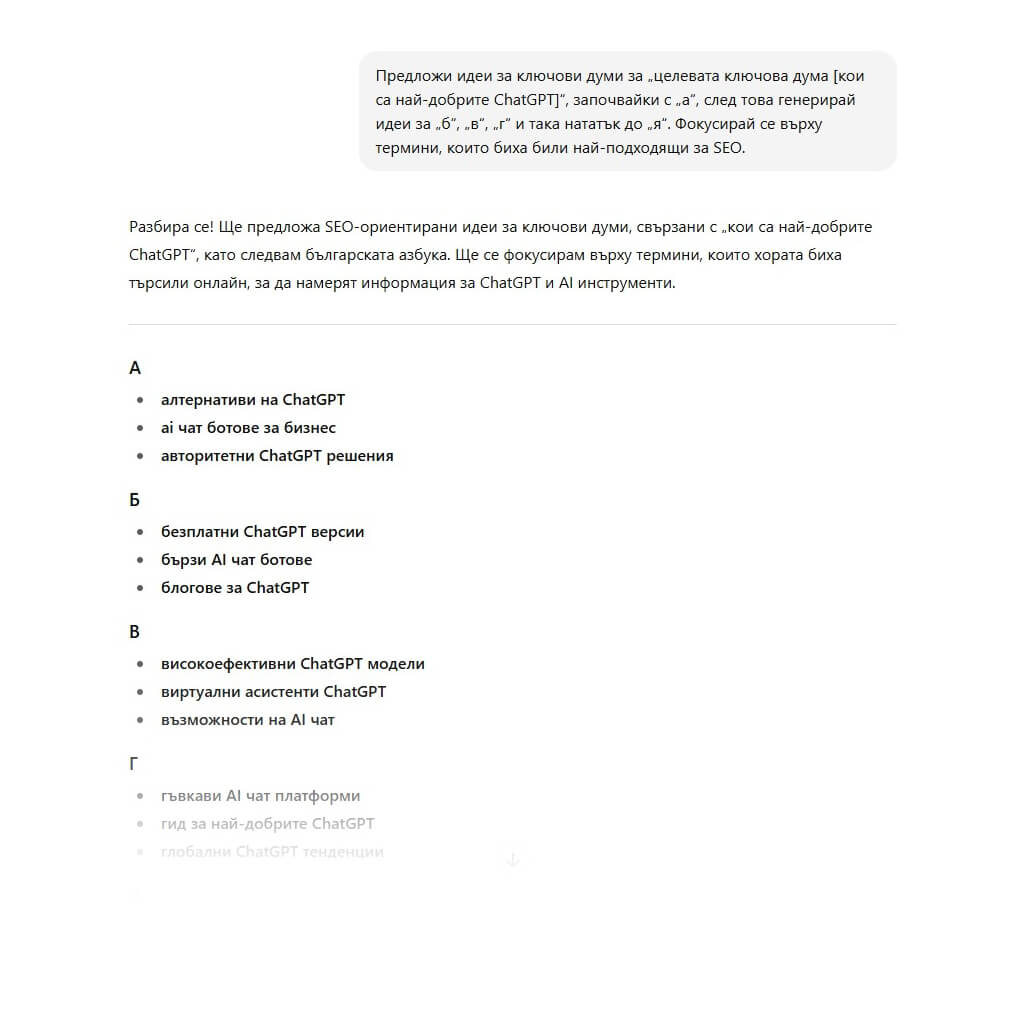
Create a long list of keyword ideas using the Alphabet Soup method
The “Alphabet Soup method” is a keyword research technique that uses Google autocomplete.
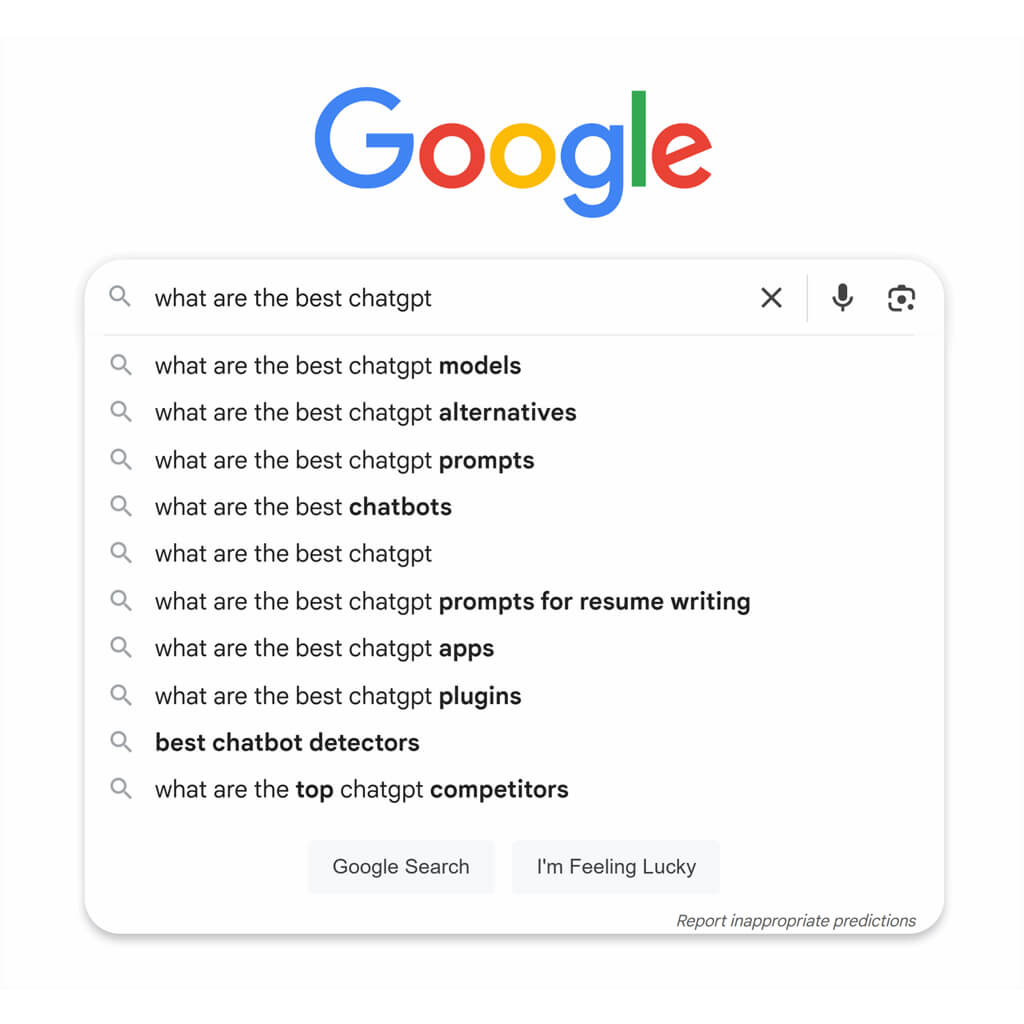
The traditional way to find these keyword ideas is to enter your target keyword and add one extra letter. Then review Google’s suggested searches for each additional letter from A to Z. This used to be time-consuming, but ChatGPT can automate the process.
Prompt:
Suggest keyword ideas for “target keyword [keyword]”, starting with “a”, then generate ideas for “b”, “c”, “d” and continue through “z”. Focus on terms that would be most relevant for SEO.
Here is what this prompt looks like when completed and submitted:
Generating long-tail queries from a head term
ChatGPT is useful for search-query analysis. Take a highly competitive keyword or phrase (head term), or one with high monthly search volume, and ask ChatGPT for long-tail queries you can use to create supporting content.
Prompt:
You are an SEO analyst helping me with keyword research. We are creating content for [head term]. Provide all relevant long-tail queries that can help us build authority around the head term and improve its rankings.
Grouping keywords by funnel stage
Just as you should group keywords by search intent, you should also sort them by marketing-funnel stage. This shows you what users expect when they land on your page.
- A search at the top of the funnel — when a user is looking for an answer to a question — means they are not ready to buy. Do not push a CTA. Simply offer them the option to subscribe to your newsletter.
- A search at the bottom of the funnel — Make it as easy as possible for the user to complete a purchase.
Prompt:
Act as an SEO analyst. Review this list of target terms [paste list]. Sort these keywords according to the stage of the marketing funnel the user is in when searching the term. Present the result as a table separating keywords into top, middle and bottom of funnel.
Creating blog ideas for ecommerce categories
If your blog posts are starting to sound the same, ChatGPT is a great source of inspiration. This example is for ecommerce categories, but you can adapt the prompt for any industry and target audience.
Include the following information in the prompt to get the best results:
- Target audience: Who are you selling to? Age, gender, location, income and other characteristics.
- Industry: What industry do you operate in? Try to be as specific as possible (“B2B ecommerce selling spare parts for Mazda cars”).
- Previous content: Explain what content you have already used to avoid duplication — bonus points if you include what performed well and what did not.
- Target category: If you have a specific category for blog posts, focus there first.
- Desired outcome: Do you want to generate more revenue? Attract more traffic? Sell a specific product?
- Unique selling proposition: What sets you apart from the competition? Lower prices? Better quality?
Prompt:
You are an expert SEO copywriter. Generate 10 blog ideas for an ecommerce brand selling [product]. Our products are more [insert advantage: higher quality, faster delivery, better service, etc.], and our target audience is [describe audience]. Here are previous blogs we have published [paste blog titles]. We have noticed that our audience especially responds to [explain your most successful content].
Focus on ideas that can guide users towards [specific product you want to sell more of]. Our goal is to [provide a clear and measurable KPI].
KPI (Key Performance Indicator) — a metric that measures how effectively a strategy, project or campaign achieves its goals.
Examples of SEO KPIs:
- Organic traffic — number of visitors coming from search engines.
- Keyword rankings — the positions of the website for specific keywords in Google.
- CTR (Click-Through Rate) — the percentage of users who click a search result.
- Bounce rate — the percentage of people who leave the site immediately after visiting it.
- Conversions — how many visitors complete the desired action, such as a purchase or registration.
Technical SEO prompts
Technical SEO covers behind-the-scenes optimisations that make your website easy for search-engine crawlers to access and navigate. This involves analysing crawling, indexing and how search engines — and users — move through your site.
Creating schema markup
There are many types of schema you can add to your page:
- Organization schema for About Us pages
- Event schema for upcoming events
- HowTo schema for guides
- Article schema for long-form content
Use tools such as Schema Markup Testing Tool and Schema Markup Validator, to see what schema competitors use and to test the code ChatGPT provides.
Prompt:
You are a technical SEO expert. I want to improve the schema markup on this page [paste content]. Here are the types of structured data my competitors use [optional, but it gives a more accurate answer]. Please provide a bulleted list of recommendations for the type of schema I should use.
Tip: ChatGPT is still learning, and schema is very specific. Always verify the output with Schema Markup Validator.
Generating a robots.txt file
A robots.txt file is a text file that search engines review before crawling your site. It contains instructions about where crawlers can and cannot go.
Prompt:
Generate a robots.txt file for [domain]. Include:
- Block all crawlers from WordPress admin (/wp-admin, /wp-login.php)
- Block staging and development subdirectories
- Allow access to CSS and JavaScript files for rendering
- Include a link to the XML sitemap [sitemap link]
Tip: Always test your robots.txt file with an external tool, to make sure you are not accidentally blocking important pages.
Creating an XML sitemap
An XML sitemap is a file that lists all website URLs search engines should be able to access. Include pages that:
- Return a 2XX status code
- Can be indexed
- Are self-canonicalised
Prompt:
Generate an XML sitemap using the following URLs [paste list of all indexable, self-canonicalised, 2XX pages].
Crawl optimisation suggestions for large websites
ChatGPT is excellent at analysing data. If you have index bloat, where search engines fail to find and index quality pages, you can use it to generate ideas for solving the issue.
Prompt:
You are a technical SEO consultant. We are [describe website niche/industry] and have an index-bloat problem. Google is not indexing our [problem pages], so they receive no traffic. What information do you need to create a crawl-optimisation and indexing strategy for these pages?
If you already have data, such as crawl logs, it is always better to give ChatGPT more information.
Prompt:
You are a technical SEO consultant. We have a problem with Google indexing new blog content. Here is our crawl-log data [paste data]. Review the content and identify crawl errors, duplicate content or pages that slow the crawler down. Create a bullet list of errors and recommendations for improving crawl optimisation.
Crawl optimisation suggestions for large websites
ChatGPT is excellent at analysing data. If you have index bloat, where search engines fail to find and index quality pages, you can use it to generate ideas for solving the issue.
Prompt:
You are a technical SEO consultant. We are [describe website niche/industry] and have an index-bloat problem. Google is not indexing our [problem pages], so they receive no traffic. What information do you need to create a crawl-optimisation and indexing strategy for these pages?
If you already have data, such as crawl logs, it is always better to give ChatGPT more information.
Prompt:
You are a technical SEO consultant. We have a problem with Google indexing new blog content. Here is our crawl-log data [paste data]. Review the content and identify crawl errors, duplicate content or pages that slow the crawler down. Create a bullet list of errors and recommendations for improving crawl optimisation.
Identifying duplicate-content risks
Google will not directly penalise you for duplicate content, but the overall effect is negative. Duplicate content confuses search engines and makes ranking and acquiring backlinks more difficult.
ChatGPT cannot crawl the URLs you provide, but it can compare content. Include information such as metadata, headings and introductions so the task can be completed properly.
Prompt:
Act as a technical SEO consultant. I am pasting metadata and H1s from 100 pages. Please review them and identify any that look too similar and may present a duplicate-content risk.
Creating a basic technical SEO checklist
If you are just starting with technical SEO or handing a task to a less experienced colleague, a basic checklist will make the process easier.
Include information such as:
- What type of website is it? (size, industry, CMS)
- How much developer support do you have for implementing changes?
- Goal of the audit
- Recent technical changes (migration, new pages)
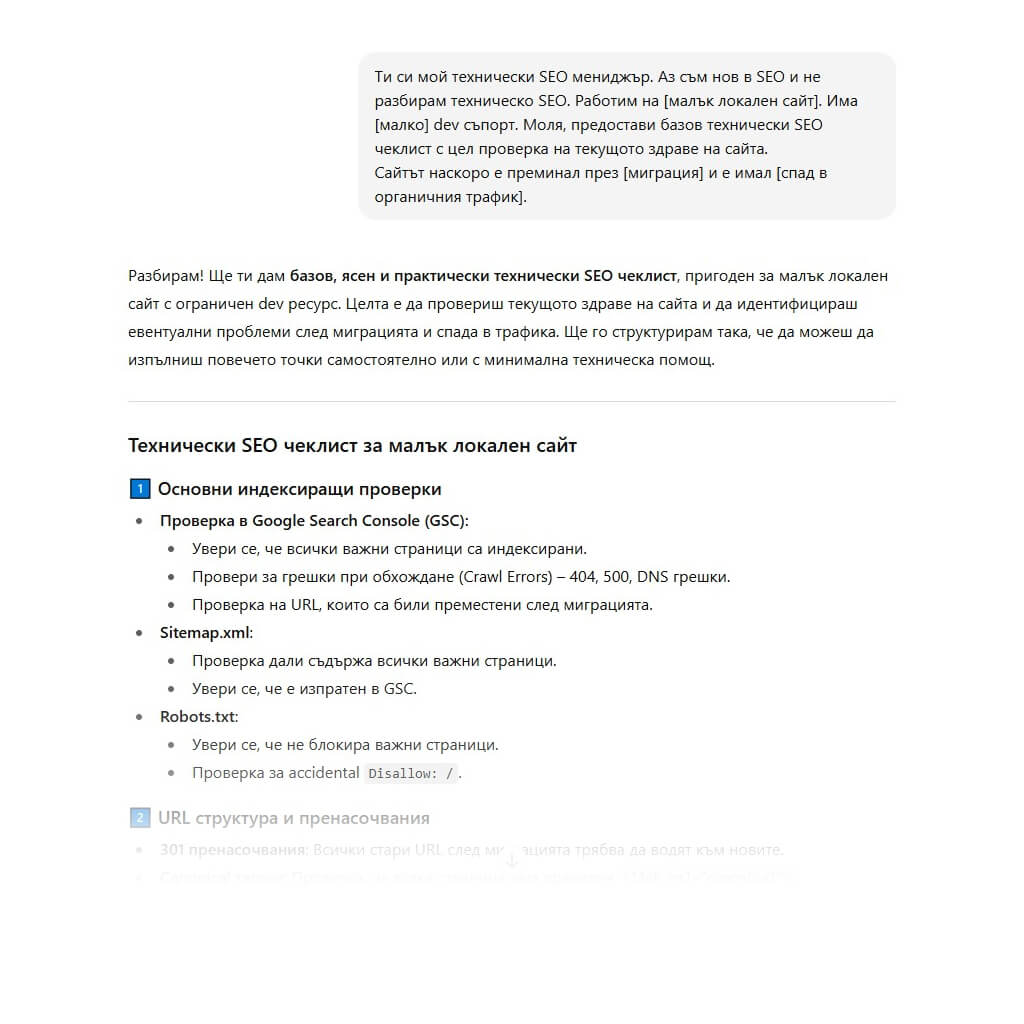
Prompt:
You are my technical SEO manager. I am new to SEO and do not understand technical SEO. We are working on [explain website type — small local, enterprise B2B, etc.]. There is [no, little, extensive] developer support. Please provide a basic technical SEO checklist for checking the current health of the website.
The website recently went through [explain recent changes, e.g. migration] and experienced [describe issues such as a drop in organic traffic].
Here is an example of ChatGPT’s response to this prompt:
On-page optimisation prompts
On-page optimisation involves editing the content on the page itself to improve keyword signals, user experience, internal linking and more. The goal is to improve page content so it can achieve higher positions in the SERPs for target terms.
Optimising page content with new keywords
It is always worth refreshing existing content. This can give older content the update it needs to start ranking again and generating valuable traffic to your website.
Prompt:
You are an SEO content expert. Review and update this copy for [target term]. [add your content here]. High-ranking competitor pages include [paste competitor content here]. The goal of this copy is to attract users from [explain funnel stage] and get them to [explain the page conversion goal]. Please provide your recommendations as bullet points.
Testing a new article introduction
Different styles and voices resonate differently with target audiences. If you notice that a blog post has a very high bounce rate and you have tried everything else, rewrite the introduction into something that resonates better.
Use ChatGPT to understand the problems and pain points of your target audience and create a new, engaging introduction.
For this prompt to work well, provide the following:
- Article content
- How you want the introduction to change (more emotional, more statistics, etc.)
- What your goal is with this change
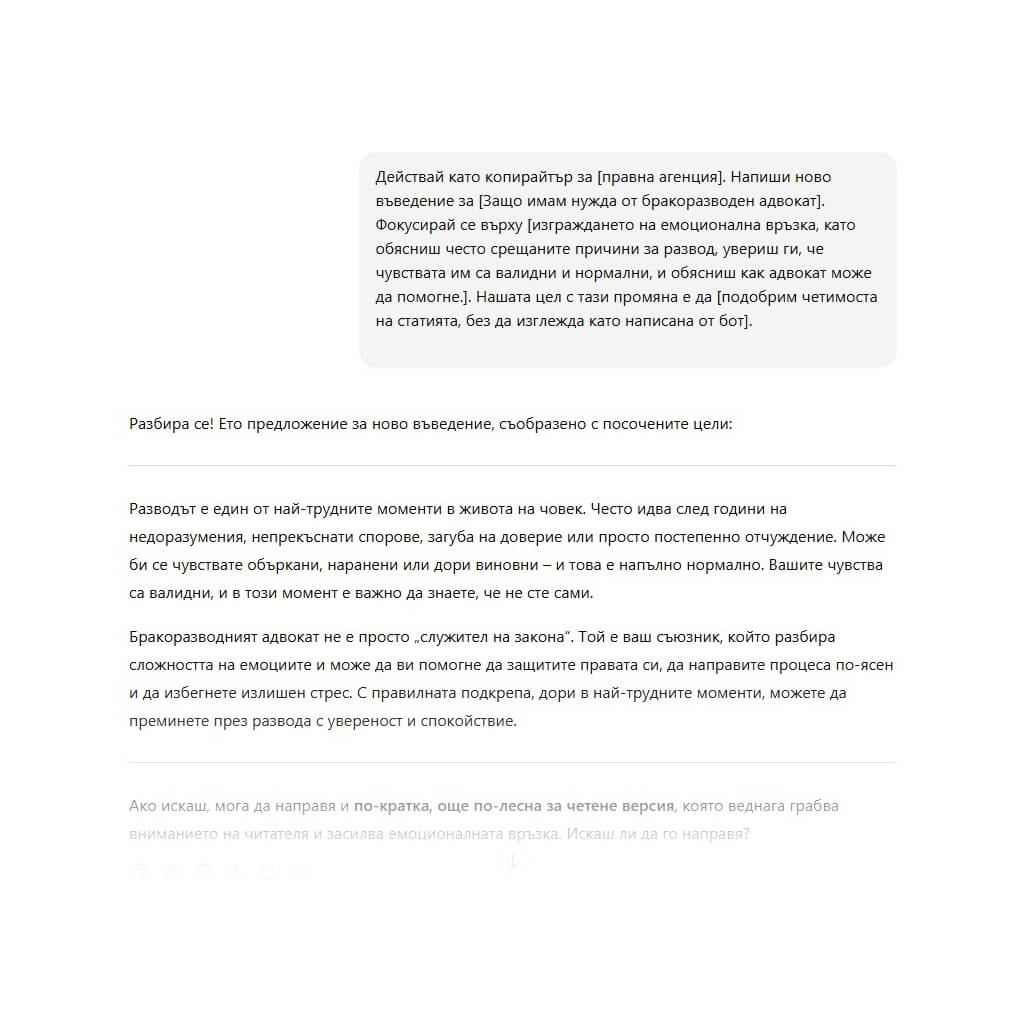
Prompt:
Act as a copywriter for [law]. Write a new introduction for [Why do I need a divorce lawyer?]. Focus on [describe the change you want to see]. Our goal with this change is to [describe the goal].
Here is what this prompt looks like:
Analysing and rewriting heading tags for SEO and UX
Your headings are important for signalling to users and search engines what a page is about. An H1 should generally stay under 70 characters, include the target keyword and summarise the purpose of the page. Subsequent headings (H2, H3, etc.) break up the text and summarise the content, making the page easier to scan.
Headings can be difficult to optimise because they need to work for both SEO and user experience (UX). Use ChatGPT to generate different ideas and quickly test A/B variations for stronger content.
You can do this for many pages at once or just a single page.
Prompt:
You are an SEO expert who understands keyword optimisation and improving on-page content for a better user experience. Review these headings [paste headings] and provide recommendations for improving SEO and UX. The goal is to improve rankings for [keyword], readability, clarity and alignment with user search intent. Keep the brand tone of [brand name]. Present your recommendations as bullet points.
Improving thin content on product or service pages
Thin content is when a page has little or no content, usually fewer than 300 words. With thin content, users and search engines struggle to understand the purpose of the page and get value from it.
Expand the content on product and service pages. Making these pages more useful to users can improve both rankings and conversions. Gather the content from one or more pages and give ChatGPT the following prompt:
Prompt:
Act as an SEO content expert. Review and improve the thin content on these [product or service] pages. Consider how to improve keyword signals for [keywords], improve user experience and preserve a strong above-the-fold experience. Present your recommendations in a table with separate columns for URL, target term, previous thin content and newly recommended content.
Suggestions for semantic keywords and related concepts
Semantic keywords and related entities are words, phrases or topics closely connected to your main keyword. For example, if you optimise for “electric cars”, related semantic terms might include “charging station” or “battery range”.
Before AI, these terms were found by analysing competitor headings, headers and content to see what topics they covered in order to rank better.
Now you can use ChatGPT for them. Here is how:
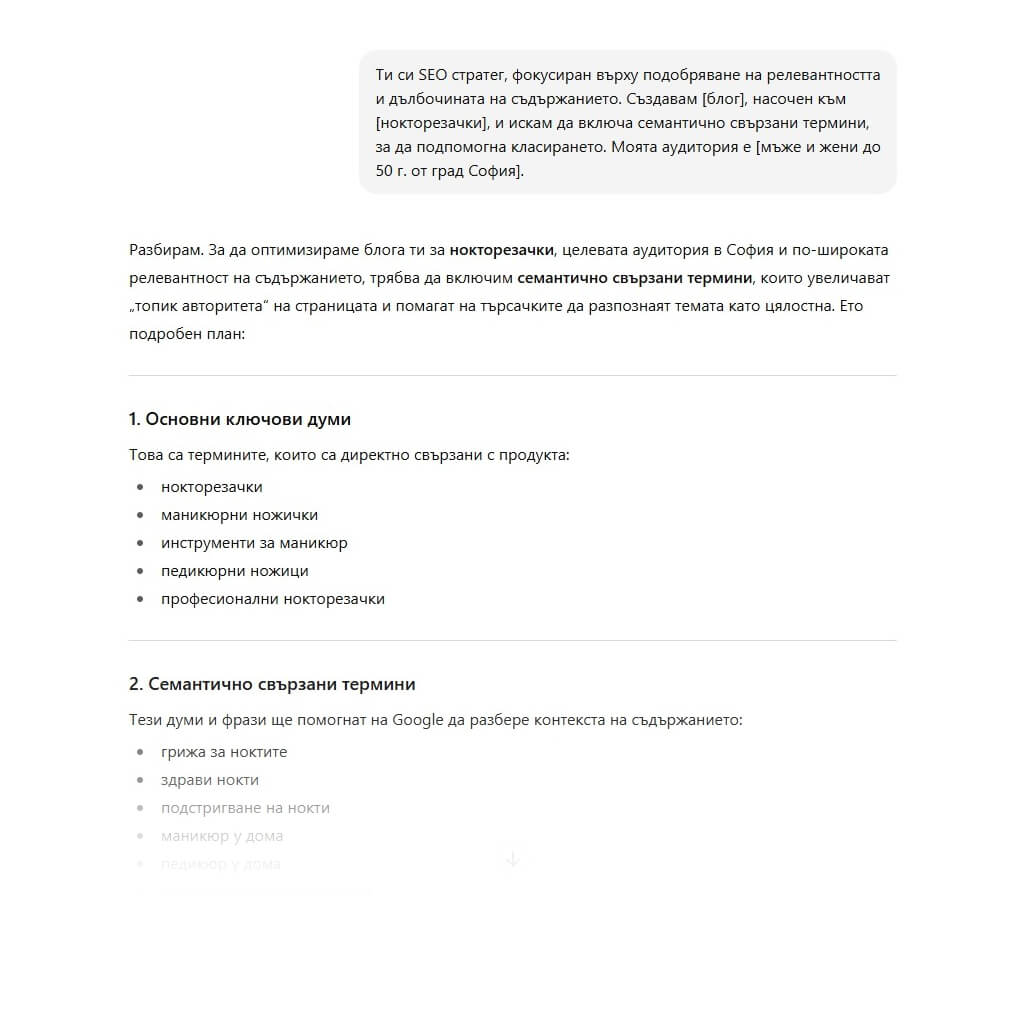
Prompt:
You are an SEO strategist focused on improving content relevance and depth. I am creating a [landing page, blog, product page] targeting [target keyword], and I want to include semantically related terms to support rankings. My audience is [brief description of target audience].
Please return:
- A list of 10–15 semantically related keywords
- Any entities (brands, tools, concepts) relevant to the topic
- Recommendations for where and how to include these entities and semantic keywords on the page
Adding updated statistics to content
Statistics are important for building authority. And no, citing a study from 2019 is not enough.
Here is what to ask ChatGPT if you want to enrich your content with fresh data:
Prompt:
Imagine you are a statistician with expertise in [target topic]. I want to update the statistics for [paste your content]. Please provide a list of relevant statistics from 2024 to 2025 on [target topic]. Include a link to the source for each statistic. Every statistic must include numbers.
Tip: Always verify the sources provided by ChatGPT before updating links on your website.
Generating structured data (JSON-LD) for a page
We have already discussed creating content for FAQ schema, but is it difficult to get ChatGPT to generate schema for you?
Surprisingly, it is quite easy.
For example, if you want to implement LocalBusiness schema to improve local SEO but are not sure what information to provide, use the following prompt:
Prompt:
Act as a local SEO professional with expertise in writing schema. We need to create LocalBusiness schema for [business]. Tell me all the information you need to generate the code.
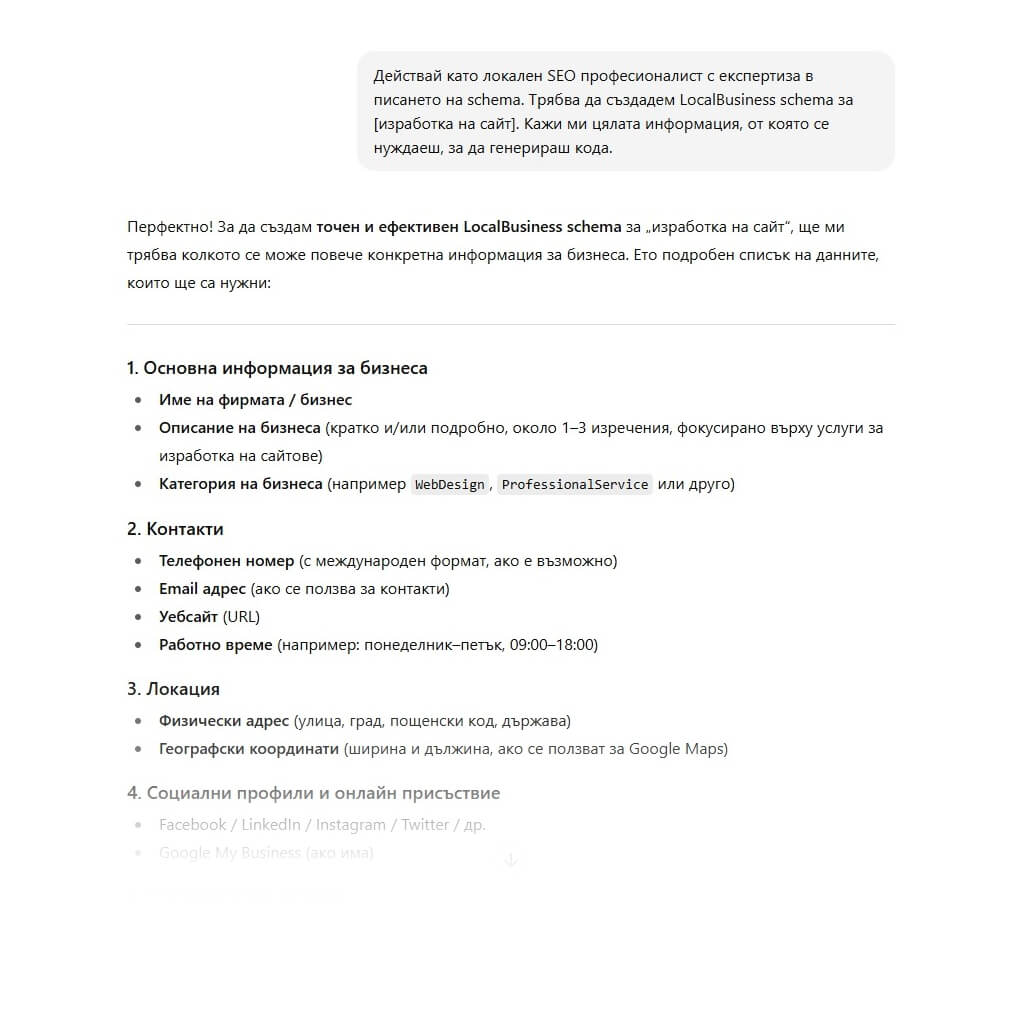
Although our goal here is to make ChatGPT work as efficiently as possible, it is better to ask it questions and allow it to ask you questions too. In this case, if you do not know what information is needed to create LocalBusiness schema, simply ask.
Once you have this information ready, here is the final prompt:
Prompt:
Act as a local SEO professional with expertise in writing schema. Create LocalBusiness schema for this organisation using the following information: [paste all relevant information ChatGPT requested].
Local SEO prompts
Speaking of local SEO, let’s look at the types of prompts you can use to improve rankings for local keywords and put your business on the map — literally.
Creating Google Business Profile descriptions
The description field is an important part of optimising your Google Business Profile (GBP).
Use this description to:
- Address audience pain points: explain how your product or service can help your target audience.
- Describe your products/services: provide a short description so any user can understand what you offer.
- Include target keywords: avoid excessive repetition by using no more than three mentions of the same term per 100 words.
- Include location keywords: mention cities, streets and landmarks near your business.
The better your description, the better Google can understand your business — improving your chances of ranking higher in local searches.
Just make sure the whole description stays under 750 characters.
This can be difficult, but ChatGPT makes the process easier by letting you mix and match different descriptions until you find one you like instead of staring at a blank page.
Prompt: Act as a local SEO expert and help me generate four different Google Business Profile descriptions for my business. My target audience is looking for [describe problem], and I sell [describe product/service]. My target keywords include [list keywords], and I want to include location-specific information such as [list landmarks]. The goal is to improve local keyword signals and make it easier for users to understand what my business does. Each description must stay under 750 characters.
If you are unsure what information to provide, simply ask ChatGPT what additional information it needs to do a better job.
Prompt: Act as a local SEO expert. I want your help writing several different Google Business Profile descriptions for my business [provide business information]. What information do you need from me to create a strong description that will help my business rank higher for searches such as [target keyword]?
And remember that ChatGPT is not especially good at following exact character-count limits, so always check the description length before publishing anything in GBP.
Creating content for location pages
Location-page content is essential for ranking in local searches. These pages clearly signal to users and search engines that you serve a specific geographic area, making it much more likely that you will appear in local search results.
What is the only problem with this type of content? It can be tedious, especially if you work with multiple locations — unless you use ChatGPT.
Let’s say you are a local pizza chain that has just opened five new locations in different areas along the East Coast. You need to be as specific as possible when providing this prompt to avoid endless back-and-forth with the AI.
Make sure you provide information about:
- Where your new locations are
- Landmarks near those locations
- Target keywords
- Target audience
- What sets you apart from competitors
- Images
- Page formatting
- Brand tone
- Previous location-page content, if applicable
- Competitor location-page content you like
Prompt: You are a local SEO expert. Help me build [number] new location pages for my [business type or industry] in the following cities [list cities and areas].
Each location serves a target audience of [describe target audience], and our brand positioning focuses on [explain primary value proposition]. Our tone is [brand voice — informative, friendly, etc.].
I like the formatting of this competitor [provide competitor content] and this competitor [provide competitor content]. I do not like how this competitor looks [provide competitor content].
Create a structure using the same formatting as the first two competitors. Include spaces for location-specific images and a map at the bottom. Focus on creating content that addresses user pain points while being optimised to perform well in local search.
Ask me any additional questions before you begin if you need more information to do a great job.
For more complex requests like this, it is always best to let ChatGPT ask for more information if needed.
Local backlink and citation-source suggestions
To support your new location pages, you will need local backlinks. Backlinks are links placed by another website that point to one or more of your pages. They are a trust signal, and the more links you earn from authoritative brands and websites, the more Google is likely to trust your brand — making it easier to rank for non-branded keywords. Local backlinks are especially useful for improving local rankings.
You can reduce the manual effort normally required for link building by using a powerful ChatGPT prompt.
Here is the information you should provide to get a useful response:
- Business type and location (e.g. a local kebab shop in Sofia, Lyulin 1)
- Target audience (e.g. a student looking for a greasy kebab as a hangover cure)
- Target keywords (e.g. “late-night kebab near me”)
- Competitors — especially those with strong backlink profiles and established brands
Prompt: You are a local SEO expert with deep experience in local link building and citation campaigns aimed at improving local search visibility. I recently opened a new location in [city, region] and want to offer [brief product/service description] to [describe target audience, e.g. students, pensioners, commuters, etc.].
My main keywords include [list 2–3 local SEO keywords], and my main competitors are [list competitors or websites].
Help me build a strong local backlink profile by providing:
- A list of relevant local blogs, news outlets or media sources in or near [city]
- Local directories or community organisations relevant to my business
- Opportunities for high-quality local or industry-relevant backlinks based on competitor profiles
Also write a short, persuasive email template I can use to pitch these sources for a link or mention. Keep my brand voice [describe tone — casual, confident, friendly, professional, etc.].
Writing responses to customer reviews in your brand voice
Keeping up with customer reviews is important, but it is also time-consuming.
The key to training ChatGPT for this task is getting it to successfully imitate your brand voice. It is poor practice when customers think they are receiving a kind and empathetic reply from a person only to realise they are interacting with a bot.
And remember: if a customer is unhappy with your product or service, always move the conversation out of the public space. You do not want an unpleasant argument in your Google Business Profile comments.
To prepare ChatGPT, provide the following information:
- Brand voice (provide previous customer replies, website copy and any available brand guidelines)
- Commonly used replies to positive, negative and neutral customer comments
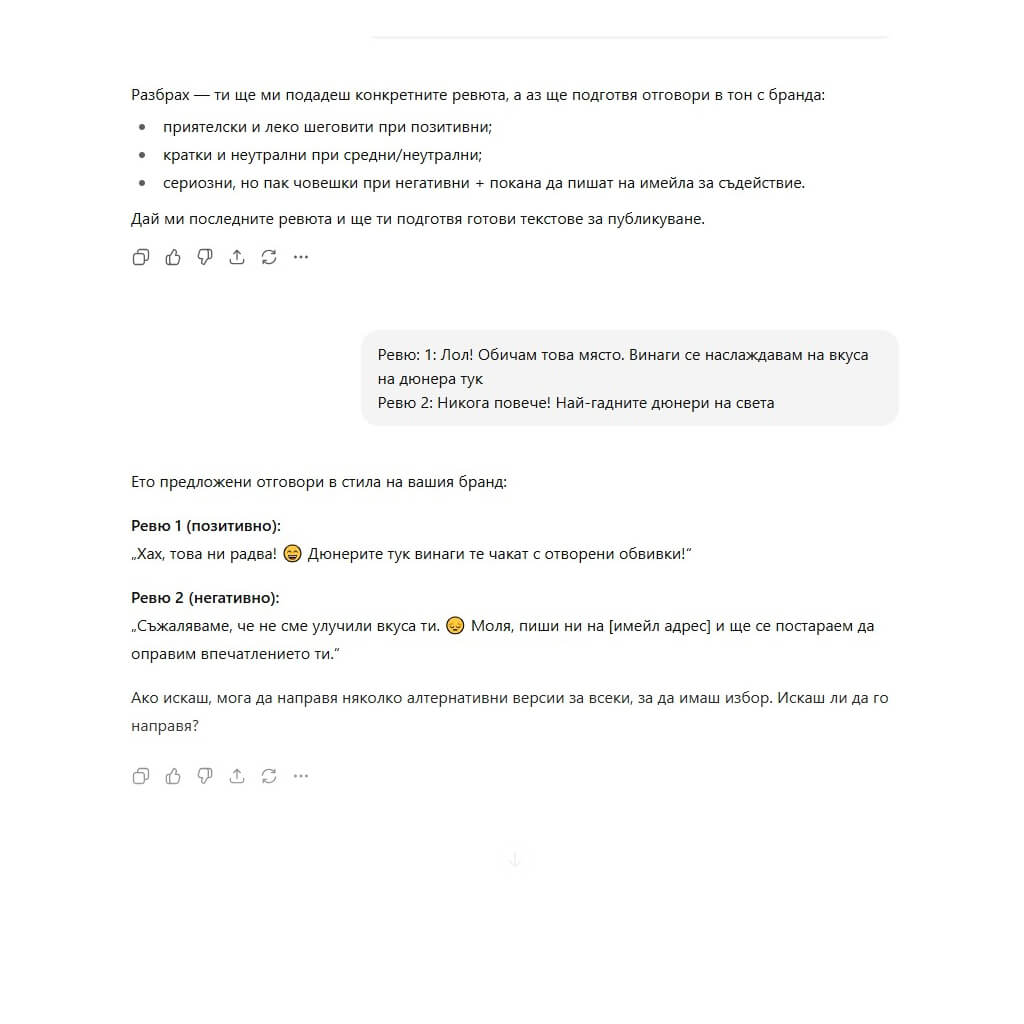
Prompt: You are a long-standing employee deeply invested in the success of [local business]. I need your help responding to customer reviews in our Google Business Profile. Our business tone is [insert brand guidelines and tone examples]. Previous replies to positive comments look like [example], neutral replies like [example], and negative replies like [example]. For all negative comments, we want customers to contact us by email so we can help them privately. I will provide a set of recent customer reviews. Please respond using our brand voice.
Here is what the response looked like for a local kebab shop that had just opened near Lyulin 1.
SEO reporting and analysis prompts
SEO reporting and analysis are important regardless of industry or company size, whether you work in an agency or as a freelancer. You will always need to extract data, analyse campaign progress and report on performance metrics.
Looking at a graph or table full of data can be intimidating. These prompts for ChatGPT can break the information down into easy-to-digest points.
Summarising GSC data in plain language
Google Search Console (GSC) should be one of your main sources of organic-search data. It is like a simplified version of Google Analytics 4 (GA4), but focused only on organic traffic.
You can use it to find information such as:
- Impressions: How often your website appears in SERP results
- Clicks: How often a user clicks your page from the SERP results
- Rankings: Average position for a specific term
- CTR (click-through rate): How often your listings are clicked compared with the total number of impressions
- Indexing issues: Errors such as 404 pages, redirects or pages excluded with noindex
- Core Web Vitals: Desktop and mobile user experience with a focus on site speed
GSC contains a lot of data, and it is easy to feel overwhelmed. ChatGPT can make the process easier.
To get a useful SEO prompt, first identify the problem you are trying to solve. Even if you do not know which table to export first, ChatGPT can help.
Common issues you may notice in GSC:
- Ranking decline
- Clicks drop, but impressions do not
- Both clicks and impressions drop, but rankings do not
- Pages are crawled but not indexed
- Pages are not crawled
The last two are common, especially on large websites. Search engines crawl first, then render, index and finally rank content. If your pages are not even crawled or indexed, organic traffic will be minimal.
To analyse these problems, prepare ChatGPT carefully to get the best answer. Watch out for hallucinations (when ChatGPT presents misleading information as true), especially when many numbers are involved. Never copy and paste AI-generated data without checking its accuracy first.
Data needed for the prompt:
- Exported data table
- Clear description of the problem
- How long the problem has existed
- Changes that happened before the problem
- Previous attempts to fix it, if any
Example prompt:
You are an SEO analyst reviewing data for [website]. We recently encountered a problem where [describe problem]. Rankings have [stayed the same, increased, decreased]. Our seasonal trends are usually [describe]. We first noticed the issue [number of weeks/months ago], but our [attempts to fix the issue] have not worked. We have made [other changes/no other changes] to the website. Please review the data for the last [period] and provide at least five possible reasons why this may be happening, along with the best ways to address these issues.
Analysis for improving page rankings
You can use GSC data to improve rankings across the whole website or for specific pages. Export a table with clicks, impressions, rankings and CTR and give it to ChatGPT for analysis.
Example prompt:
You are an expert SEO analyst. Here is the data for [list target pages]. We want to improve [rankings, clicks, CTR, etc.]. What strategy would you recommend for optimising these pages?
Creating SEO summaries for clients
Translating SEO into client-friendly language can feel like translating a foreign language. There are many acronyms and terms, and Google’s algorithm changes constantly.
ChatGPT can translate technical SEO terminology into easy-to-understand language, saving you time.
Example prompt:
You are an SEO expert and client manager. Translate the following technical text into easy-to-understand language in one or two paragraphs: [enter text].
Comparing organic traffic YoY or MoM
Keep track of organic growth or decline. ChatGPT can interpret fluctuations in a graph so you do not have to stare at the screen for hours.
Example prompt:
You are an SEO analyst with five years of experience reviewing MoM and YoY data and developing hypotheses about the causes of traffic changes. Here are the latest MoM results for a page optimised three months ago [enter data]. What do you recommend testing or optimising to improve [clicks, revenue, CTR]?
YoY (Year over Year) and MoM (Month over Month) are two different ways to compare this traffic:
- YoY — Year over Year
- Compares traffic for a given period with the same period in the previous year.
- Example: organic traffic in September 2025 compared with September 2024.
- Goal: to see the long-term trend — whether the website is growing compared with last year.
- MoM — Month over Month
- Compares traffic for a given month with the previous month.
- Example: organic traffic in September 2025 compared with August 2025.
- Goal: to see short-term changes and seasonal fluctuations.
💡 Example:
- September 2025: 10,000 visitors
- August 2025: 9,500 visitors
- September 2024: 8,000 visitors
- MoM change: (10,000 - 9,500) / 9,500 × 100 ≈ +5.3%
- YoY change: (10,000 - 8,000) / 8,000 × 100 = +25%
Suggesting SEO KPIs based on a business model
Finding the right SEO KPIs can be difficult. ChatGPT can help if you provide clear information:
- Product or service
- Target audience
- Industry
- Competitive landscape
- SMART SEO goals (e.g. increasing organic traffic or generating more revenue from organic search)
Example prompt:
You are an SEO consultant. Review the organic KPIs for my business [business name]. We offer [product/service] in [industry]. Our main competitors are [list competitors]. Our goal is [SMART SEO goal]. Which SEO KPIs do you recommend tracking to measure the effectiveness of our optimisation?
Competitor analysis
Competitor analysis is important for keeping up with market strategy. ChatGPT can help even if you do not have time to monitor competitors yourself.
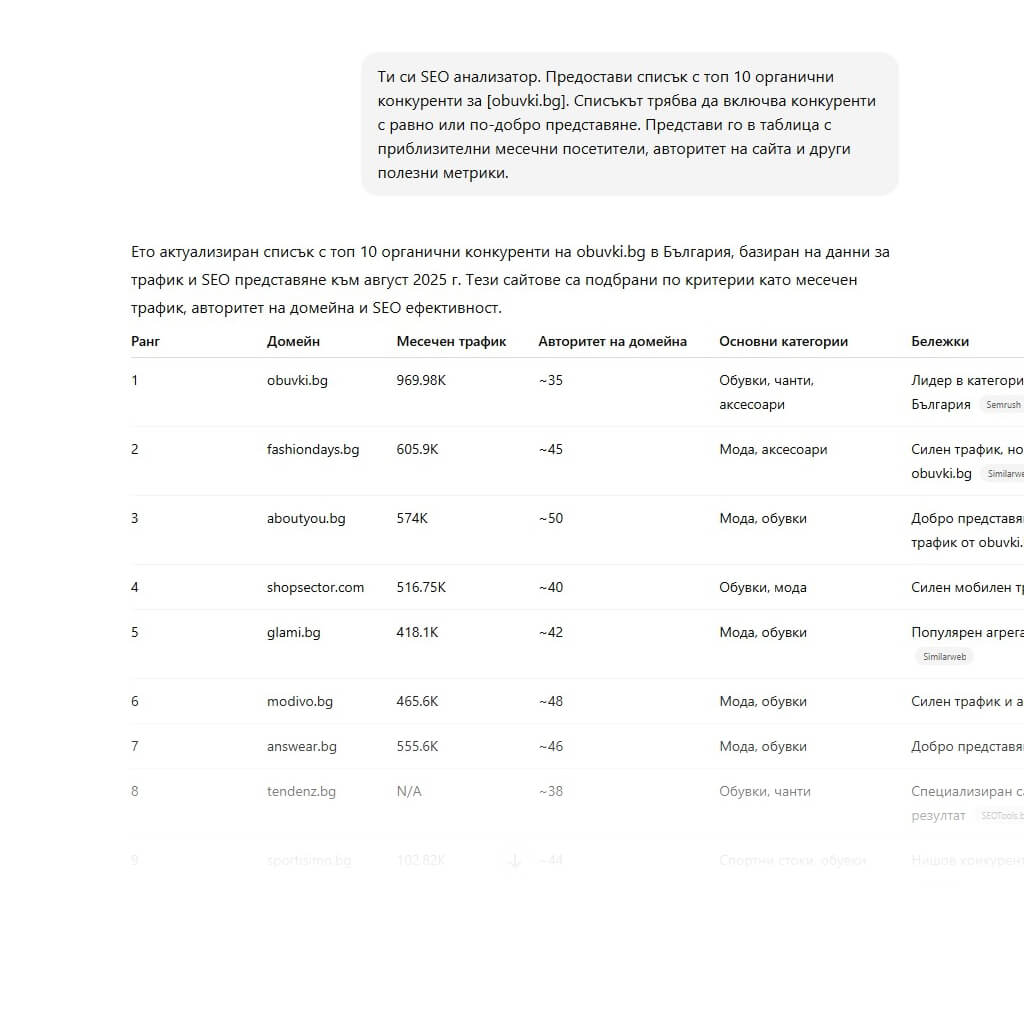
Example prompt:
You are an SEO analyst. Provide a list of the top 10 organic competitors for [website]. The list should include competitors with equal or better performance. Present it in a table with estimated monthly visitors, site authority and other useful metrics.
Deep competitor analysis and LLM visibility
If you want to go even deeper, consider analysing brand sentiment and LLM visibility against competitor performance through Semrush Enterprise AIO.
Identifying competitor target personas and keywords
Use this prompt, to identify competitor personas and target keywords that can inform your organic strategy.
This information will help you improve your own target personas and expand your keyword list.
Why look at competitors? If they have already done the hard work, why not learn from it?
Prompt:
You are an SEO content expert. Analyse these pages to determine this competitor’s audience and target keywords so they can inform the SEO strategy for [your brand name]. Present the information in a table including the brand, who the content is intended for and which keyword the content targets.
Competitor content-gap analysis
Use ChatGPT to discover new topics your competitors rank for but you do not. This is useful when you feel you have run out of blog-post ideas.
Prompt:
You are an SEO expert. Here is a table with the URLs of all previous blog posts on our website. Compare this list with competitors [site 1], [site 2] and [site 3] and provide recommended target keywords for topics they cover but we do not. Present the output as a target topic with a list of relevant keywords.
Competitor E-E-A-T analysis
E-E-A-T (expertise, experience, authority and trust) shows search engines and users who you are and why you are qualified to speak about a topic. Monitor competitors to see how they signal E-E-A-T and improve your own presentation.
Prompt:
You are an SEO expert at Lily Ray level in E-E-A-T. Analyse this competitor’s content [paste competitor content]. Compare it with our current E-E-A-T content [paste your own content]. Create a table with columns for what we can improve, expected ROI and required effort level.
Auditing competitors’ SEO strategy
Use a combination of ChatGPT and SEO tools such as Semrush and Ahrefs, to monitor competitors and adapt their organic strategies.
You can ask ChatGPT to focus on specific aspects such as:
- Content: writing style, keyword use, content structure
- Link strategy: internal and external links
- Metadata: title tags and meta descriptions
Specific prompt:
You are an SEO analyst for [your website URL]. We are auditing competitor [competitor name] to see how we can emulate and improve their site-wide keyword strategy. Based on their content, provide their top keywords and page-optimisation strategies. Give a list of recommendations for how we can outperform them in organic search.
Prompt for a complete competitor analysis:
You are an SEO analyst for [your website URL]. We are auditing competitors [competitor 1], [competitor 2], [competitor 3]. We want to improve [organic rankings, traffic, revenue] to match or outperform them. Review each competitor website and provide recommendations on what they do better than us, what they do worse and how we can improve our website based on these findings.
Advanced and unconventional SEO prompts
Creativity is the only limit when using ChatGPT (plus the free GPT-4o model limit of 20 messages every 3 hours). Here are some ideas:
Generating templates for programmatic SEO
Programmatic SEO uses technology to scale and automate optimisation. It is common on large websites that do not have time to review every page manually. It works best with a template that can be applied across the website.
ChatGPT can help with:
- Generating landing-page content templates at scale
- Suggesting modular sections based on use case
- Optimising metadata for the target keyword
- Generating FAQ sections for product or service pages
- Creating internal-linking logic for different website folders
Data needed for the prompt:
- Primary SEO purpose of the content (local pages, blog, ecommerce PDP)
- Keyword format (e.g. “best [service/product]” or “best [service/product] in [city]”)
- Target audience
- Desired page structure (H1, H2, H3, intro, conclusion, CTA, FAQ, etc.)
- Variable data (city, service type, ratings, etc.)
- Tone/writing style
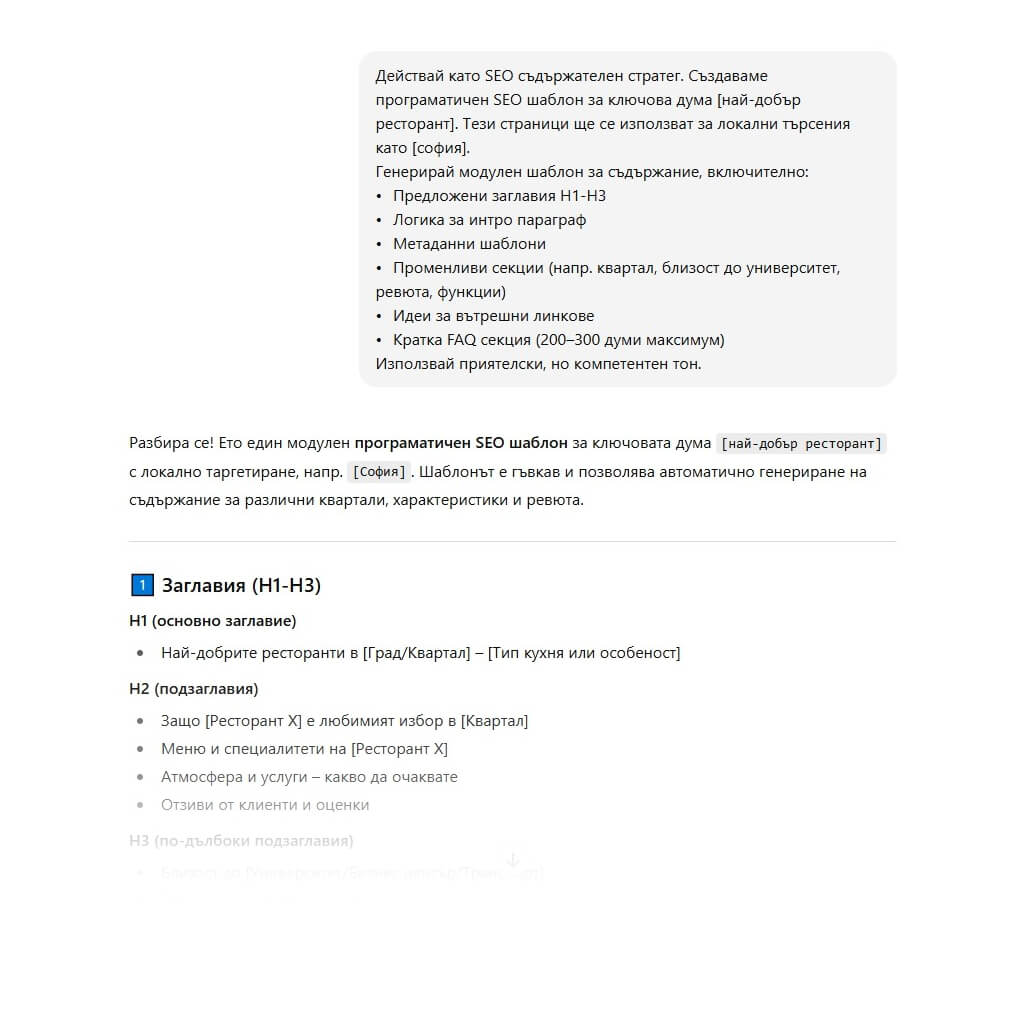
Prompt:
Act as an SEO content strategist. We are creating a programmatic SEO template for the keyword format [keyword format]. These pages will be used for local searches such as [keyword example].
Generate a modular content template including:
- Suggested H1-H3 headings
- Intro-paragraph logic
- Metadata templates
- Variable sections (e.g. neighbourhood, proximity to a university, reviews, features)
- Internal-linking ideas
- Short FAQ section (200–300 words maximum)
Use a friendly but knowledgeable tone.
Here is what ChatGPT’s response looks like when this prompt is used for a food blog:
Predicting what Google may show in Search Generative Experience (SGE)
Let’s be clear. No, ChatGPT is not a crystal ball — but it can try to help. It can simulate an AI-generated summary that Search Generative Experience (SGE) might provide. You simply need to give it the right information.
What you need:
- Search query (for example, our local kebab-shop example: “is a greasy kebab good for a hangover?”)
- Target audience (students looking out of the window at the kebab shop, slightly hungover early in the morning)
- Current top-ranking pages and other SERP content (optional, but makes the prediction more accurate)
- Your own content (also optional)
Prompt:
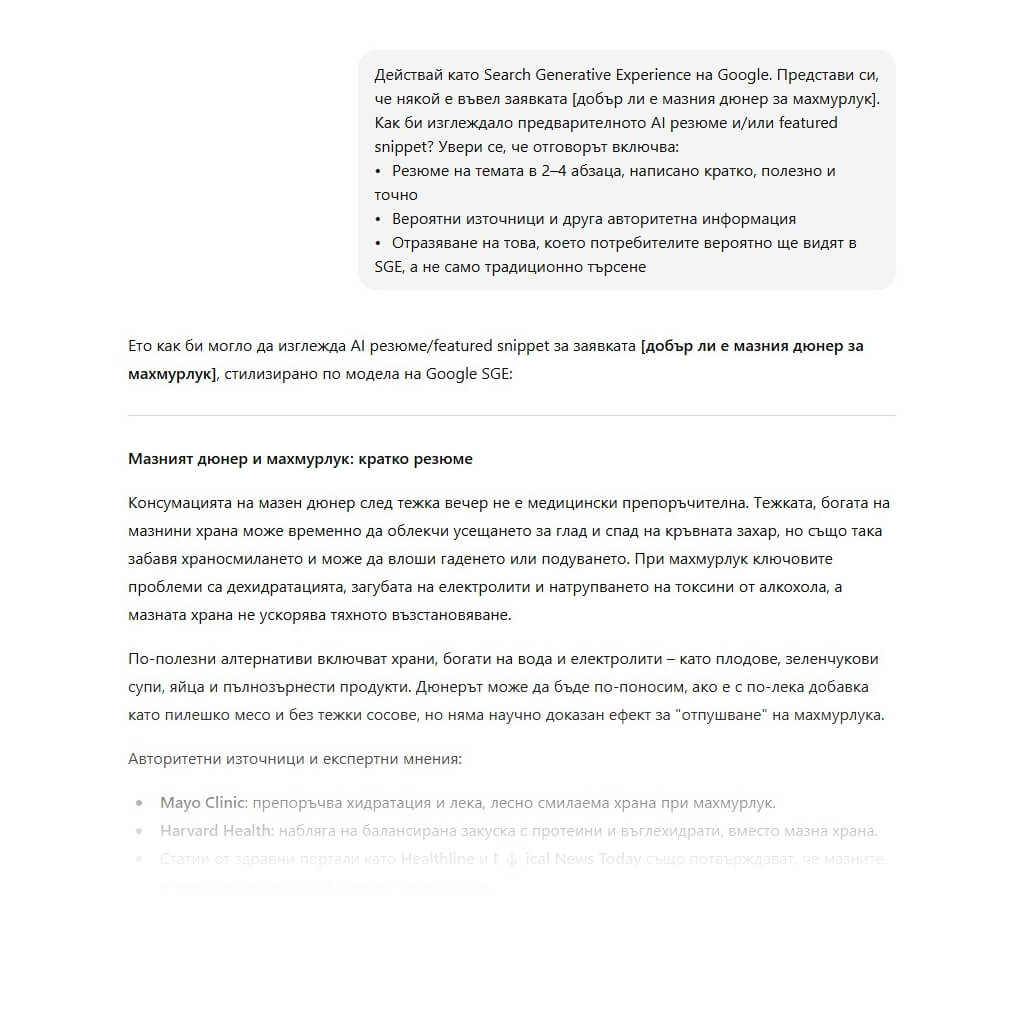
Act as Google’s Search Generative Experience. Imagine someone entered the query [keyword]. What would the preliminary AI summary and/or featured snippet look like? Make sure the answer includes:
- A 2–4 paragraph summary of the topic, written concisely, helpfully and accurately
- Likely sources and other authoritative information
- A reflection of what users are likely to see in SGE, not just traditional search
Here is what ChatGPT’s response looks like for the example “is agreasykebab good for a hangover?”:
You can make your prompt even more specific with these additions:
- Assume the user is [your target persona]
Use a mix of informational and commercial intent if the query has mixed search intent
Zero-click SERP survival prompt
Zero-click SERPs, where users receive information directly in the SERP without clicking anywhere, are a nightmare for many definition-style pages. These results are increasingly common for guides, informational queries, branded queries and even tools such as calculators, where users get everything from the SERP itself.
You can still extract value from these pages — use ChatGPT for inspiration.
Information to provide to ChatGPT:
- Target keyword
- Search intent type
- SERP format (featured snippet, knowledge panel, etc.)
- Goal (do you want to win the snippet, attract clicks beneath it or build brand awareness?)
Prompt:
You are an SEO strategist specialising in helping pages that rank in zero-click SERPs generate ROI. You are targeting [keyword], a query with [informational, commercial, etc.] search intent that appears in a SERP with features such as [People Also Ask box, featured snippets, etc.]. Based on this information, provide a strategy for optimising my page to gain value from this zero-click SERP format.
Entity-based content enhancement
Entities are simply a modern name for the “things” Google recognises — organisations, locations, products and more. They exist in Google’s Knowledge Graph and help search engines connect and recognise topics. Optimising content for entities helps Google understand your content more clearly, which can improve rankings.
Information to provide to ChatGPT:
- Primary keyword or topic
- Content type
- Target audience
- Current draft text, if available
- Competitors you want to outperform, optional
Prompt:
Act as an SEO content strategist. For the topic [target keyword], list 15–20 entities such as companies, people, tools and technologies that would improve the semantic depth of the blog post. Include both broad and niche entities. Identify places in the blog [paste content] where I can naturally add these entities to improve the semantic SEO signal.
If we move from the pizza example to a more complex topic such as cloud communications and ask for help with “what are cloud communications?”, ChatGPT can identify common entities to include in the content.
Predicting SERP features
Many SEO activities are reactive and try to defend against new algorithm updates, so use ChatGPT to stay one step ahead. It can give you an advantage over competitors.
Remember: ChatGPT does not “see” Google results the same way a person does. But it can still use current information to provide the most relevant answer for your query.
What to provide to ChatGPT for a successful prompt:
Many SEO activities are reactive and try to defend against new algorithm updates, so use ChatGPT to stay one step ahead. It can give you an advantage over competitors.
Remember: ChatGPT does not “see” Google results the same way a person does. But it can still use current information to provide the most relevant answer for your query.
Combining SEO with CRO suggestions
CRO (Conversion Rate Optimisation) is the art of turning a page with traffic but no revenue into one that generates revenue. Essentially, it involves A/B testing copy, images and even button placement to increase conversions.
SEO and CRO work hand in hand: SEO brings visitors to the page, while CRO converts them.
Information you should provide to ChatGPT:
- Target-page URL and content
- Primary keyword
- Optimisation goal (for example, more newsletter sign-ups, organic traffic, etc.)
- Target audience
- Known issues (for example, increasing bounce rate or low interaction with the CTA at the bottom of the page)
Prompt:
Act as an SEO and CRO strategist. Review this page [enter URL], targeting [keyword]. The goal is to improve [enter goal: organic revenue, CTA, etc.].
Here is the page copy: [enter text]
Please suggest:
- SEO improvements (headings, keyword use, internal links)
- CRO improvements (CTA placement and copy, layout suggestions, readability)
Return the results in a two-column format: SEO suggestions on the left and CRO suggestions on the right.
How to use these 44 ChatGPT prompts for SEO effectively
When used correctly, ChatGPT is a powerful SEO tool. It can turn hours or even days of work into a 15-minute task. But you need to provide the right prompt to get the right answer.
Save these instructions, test the prompts, integrate them into your workflow and do not be afraid to make edits. This is just one way to use ChatGPT — not the only way.
The best SEO prompts for ChatGPT are the ones tailored to you — your brand guidelines, goals and style. Once you master ChatGPT, try other LLMs to see which gives you the best results.